
Highlight Reels for Niche Communities: Ultimate Guide
Step-by-step guide to creating Instagram Highlights and Reels for niche audiences: audience research, custom covers, hashtag strategy, and analytics.
Step-by-step guide to creating Instagram Highlights and Reels for niche audiences: audience research, custom covers, hashtag strategy, and analytics.
4.98 /5 - from 58k reviews
Trusted by 50,000+ creators — get real engagement delivered to your profile in minutes, not days.
Instagram Highlights are a powerful way to showcase your best Stories and connect with niche audiences. Unlike regular Stories that disappear after 24 hours, Highlights stay on your profile, making them a great tool to organize, display, and share valuable content. For niche communities, Highlights act as a quick visual summary of your identity, values, and offerings.
Here’s what you need to know:
To succeed, research your audience, track trends, and create Highlights that answer their needs. Use tools like Instagram Insights to monitor performance and refine your strategy. Platforms like UpGrow can also help you target the right audience and grow your community effectively. Start by organizing your content, designing custom covers, and focusing on clear, engaging storytelling.
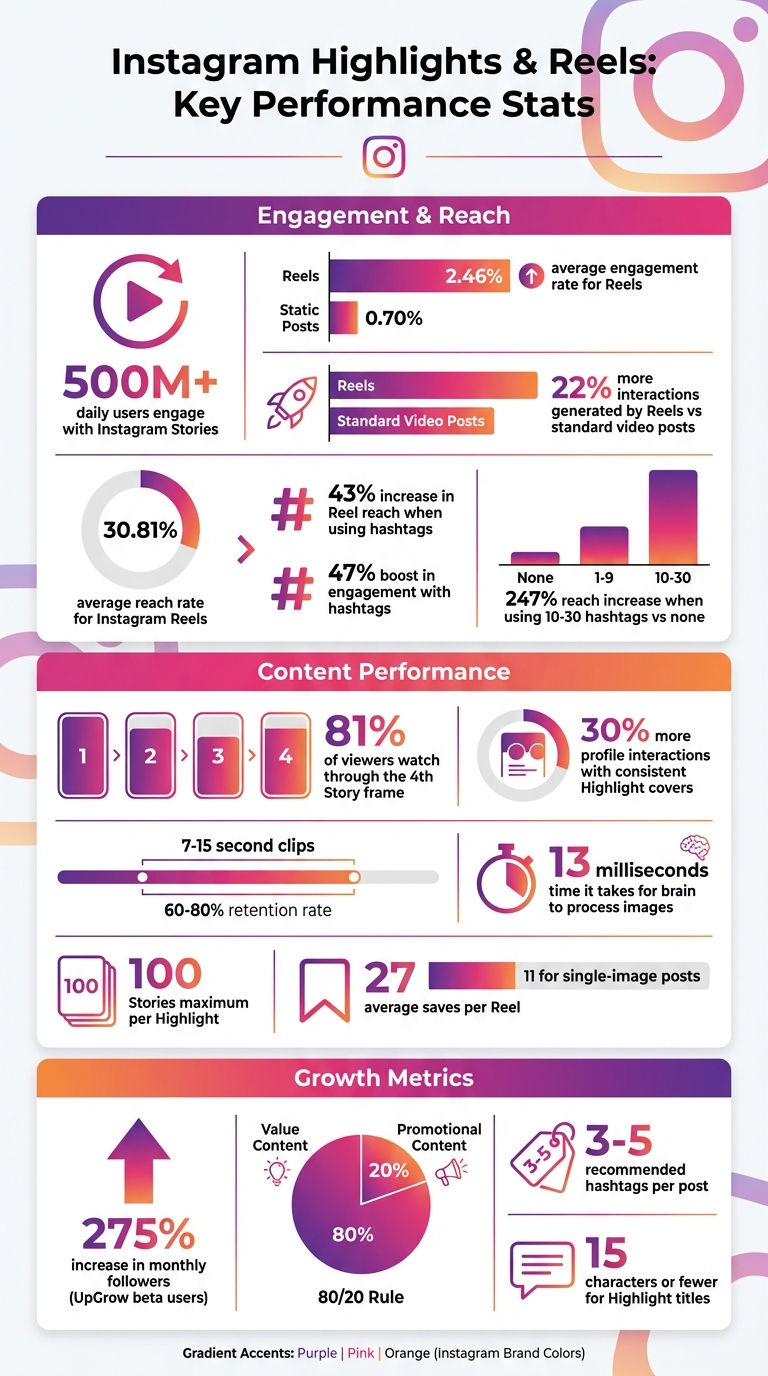
Instagram Highlights & Reels Performance Statistics for Niche Communities
Before diving into creating Highlights, it’s crucial to pinpoint exactly who your audience is. A niche community is built around shared interests, behaviors, and preferences. The better you understand them, the more effective your Highlights will be at turning casual visitors into loyal followers.
Start by analyzing your competitors on Instagram. Look at accounts similar to yours and analyze their followers and their most engaging posts to identify areas where your strategy could improve or stand out. Use Instagram's search bar to type in niche-related keywords and pay attention to the autocomplete suggestions - these can reveal trending topics and interest clusters.
Leverage Instagram Story stickers like polls, sliders, and Q&A boxes to collect direct feedback from your audience about what they enjoy seeing. This feedback is a goldmine for understanding their preferences. Also, check your Professional Dashboard under the "Inspiration" tab to discover Reels that resonate with your followers and align with your content.
Try the 5-3-1 Rule every day: like five posts in your niche, leave meaningful comments on three, and follow one new relevant account. This approach not only keeps you active in your community but also provides insight into ongoing conversations. Pay attention to what content gets saved and shared - these actions are stronger indicators of value than likes alone.
Use these observations to fine-tune your daily trend tracking and adjust your content strategy accordingly.
Once you understand your audience, spend 15 minutes a day identifying new trends. Dedicate five minutes to reviewing Reels for recurring hooks, five minutes to checking trending audio in your Professional Dashboard, and five minutes to monitoring changes in Instagram search autocomplete. This quick routine ensures you stay updated on what’s gaining traction in your niche.
Organize your research into three categories:
Track five to seven competitors and assess content saturation. If everyone is posting the same "Monday Motivation" content, consider pivoting to something unexpected, like "Why I Gave Up Morning Routines", to stand out.
When preparing content for Highlights, choose up to three relevant "Topic Tags" in your settings. These tags help the algorithm connect your content to the right audience. Also, remember that keywords in captions and alt text are becoming increasingly important for discoverability as Instagram shifts toward a search-engine approach. Focus on a few niche-specific hashtags instead of generic, high-volume ones.
"The most effective way to grow on Instagram is to consistently create engaging reels, as reels are the best way to reach new audiences." - Carly Lynn, Instagram Creator Partnerships at Meta
Keep an eye on trends across platforms too. TikTok’s Creative Center can help you spot viral movements before they hit Instagram. Additionally, explore gated groups on Facebook, LinkedIn, or Reddit. With over 130,000 active subreddits, these platforms host organic discussions that can reveal pain points and themes your audience cares about most. Incorporating these insights ensures your Highlights address the topics that matter most to your community.
Once you’ve nailed down your audience and their interests, it’s time to craft Highlights that truly resonate. The key? Focus on value-driven content - think quick educational snippets, industry tips, or "how-to" guides. These not only build trust but also foster engagement. Here's why: Reels boast an average engagement rate of 2.46%, far surpassing the 0.70% seen with static posts, and they generate 22% more interactions than standard video posts. Now, let’s break down some Highlight categories that can guide visitors from curiosity to action.
To maximize the impact of your Highlights, structure them to curate and share content that leads visitors through a clear journey - from introduction to conversion. Start with categories that answer your audience’s most pressing questions.
When organizing your Highlights, prioritize the most important ones - like "About Us", "Services", or "Reviews" - in the first five spots. Most mobile devices display only four to five circles before users need to swipe, so placement matters. Keep titles concise, ideally 15 characters or fewer, to avoid truncation. Finally, think of your Highlights as a sales funnel: start with Awareness (Brand Story), move to Interest (Demos), then Consideration (Reviews), and end with Purchase (Offers).
Once your categories are ready, focus on making each clip as engaging as possible. Short clips - between 7 and 15 seconds - tend to hold attention best, with retention rates ranging from 60% to 80%. Use the 3-Second Rule to grab attention right away with a bold statement or question. For readability, stick to 5–7 words per frame, and ensure text and visuals are centered within the 9:16 frame so they aren’t obscured by Instagram’s interface buttons.
Want to keep viewers hooked? Create loopable content where the end flows seamlessly back to the beginning, encouraging repeat views. Each Highlight can include up to 100 photos or videos, giving you plenty of space to tell your story . Refresh your Highlights every few weeks to remove outdated content and keep your profile looking fresh and relevant.
Customizing your Instagram Highlight covers is a simple yet powerful way to make your profile stand out and resonate with your audience. These covers are the first thing visitors notice when they view your profile, and studies show visitors form an impression in less than a second. Visual consistency plays a huge role here - profiles with well-matched Highlight covers enjoy up to 30% more profile interactions compared to those with scattered or default designs. Considering that the human brain processes images in just 13 milliseconds, your covers need to be visually appealing and instantly recognizable.
Your Highlight covers should align with your audience's expectations. For example, beauty brands often choose pastel tones with clean, minimalist icons, while tech-focused profiles might go for bold, high-contrast visuals. Establishing a design system can help you stay organized and on-brand. Try these approaches:
When designing covers, stick to 1,080 x 1,920 pixels and ensure critical elements fall within the inner 500 x 500 pixel safe zone to avoid being cropped out in Instagram’s circular format. Save your designs as PNG files for sharp, high-quality visuals. To maintain consistency, batch-create all your covers at once, keeping stroke weights and color saturation uniform. Don’t forget to test how your covers look in both light and dark modes to ensure they remain visually striking.
Consistency across your Highlight covers strengthens your brand identity on Instagram and creates a polished look. Limit yourself to 5–7 Highlight categories, as most devices display only the first four to five icons prominently. Stick to 2–3 primary brand colors for backgrounds or icons to ensure your covers are instantly recognizable. For text-based covers, use the same font and weight across all Highlights for a cohesive appearance. Keep titles short - 10 characters or fewer - to prevent them from being cut off on mobile screens.
"Custom Instagram highlight covers instantly elevate your profile's visual appeal and brand consistency." – David Olsen, Sked Social
To update your Highlight covers without notifying your followers, use the "Edit Highlight" > "Edit Cover" feature. This allows you to upload new designs directly from your camera roll without adding them to your active Story. It’s an easy way to refresh your profile’s look whenever you want.
Creating great content is just the first step - getting it seen requires working with the Instagram algorithm. Instagram uses hashtags and keywords to categorize content, helping it reach niche audiences through the Explore page and Reels tab. Adding hashtags can increase Reel reach by 43% and engagement by 47%. In fact, using 10–30 hashtags can boost reach by up to 247% compared to skipping them altogether.
Here’s how to make hashtags and keywords work for you.
Hashtags are more than just trendy add-ons - they’re tools to connect with your audience. The "3x3 Rule" is a simple way to structure your hashtag use: include three hashtags for the "what" (your product or service), three for the "who" (your target audience), and three for the "why" (the problems you solve or the value you offer). This approach strikes a balance between broad visibility and targeted engagement. Combine trending, high-volume hashtags for reach with niche-specific tags to attract the right audience and build a sense of community.
"Hashtag is akin to 'google search engine' on the social media platforms." – Clarice Lin
Instagram suggests using 3–5 hashtags per post and placing them at the end of your caption to keep things tidy while maximizing discoverability. For Stories, you can hide hashtags behind stickers or shrink them to make them invisible while still searchable. To keep your strategy fresh, create 3–4 hashtag sets tailored to different content types like tutorials, testimonials, or behind-the-scenes posts, and rotate them to avoid being flagged by the algorithm. Use "CamelCase" formatting (e.g., #NicheCommunity) to make hashtags easier for screen readers to interpret. Match your hashtag strategy to your Highlight themes to reinforce your brand’s identity.
| Hashtag Strategy | Target Audience | Primary Goal |
|---|---|---|
| Viral/Broad | General Instagram users | Brand awareness & discovery |
| Niche/Professional | Qualified leads & peers | Authority & lead generation |
| Micro-Community | Specialized enthusiasts | Loyalty & community building |
| Call-to-Action | Bottom-of-funnel users | Conversions & sales |
Hashtags aren’t the only way to increase visibility. Promoting your Highlights through Stories and Posts can amplify your reach even further. Since Highlights appear prominently under your bio, they’re often one of the first things visitors notice. Stories also perform well - 81% of viewers stick around through the fourth frame, giving you ample time to deliver your message. Use interactive stickers like polls, quizzes, and "Add Yours" to drive engagement before saving Stories to Highlights. These interactions help your brand stick in viewers’ minds.
Reels, which generate 22% more engagement than standard video posts, are another great way to cross-promote your Highlights. Include clear calls-to-action like “Check out my Highlights for the full tutorial” to guide viewers from Reels or feed posts to your Highlights.
The first 24 hours after publishing are critical - engagement during this period often determines a post’s long-term success. Share feed posts to your Stories to expand their reach, and archive the best-performing ones into Highlights for easy access. Since many users watch Stories without sound, add captions or on-screen text to frames intended for Highlights. You can also use link stickers within Highlights to direct traffic to product pages, booking sites, or other resources. Consistency is key - posting regularly keeps your content relevant and ensures it reaches your niche audience.
Creating niche-focused Highlight Reels is just the beginning. To truly grow, you need to track their performance and adjust your strategy based on what works. Instagram has streamlined its metrics, now focusing on "Views" across all content types. This change replaces the older "plays" and "impressions" system, offering creators a clearer understanding of content performance. But don’t stop at views - digging into additional metrics can reveal what resonates with your audience, what doesn’t, and where to improve.
Views count how many times your Reel was watched for at least three seconds. While they’re a good starting point, pairing them with other metrics provides a fuller picture. For example, Reach shows how many unique accounts saw your content. For niche creators, the percentage of non-followers reached is especially important for expanding your audience. On average, Instagram Reels have a 30.81% reach rate, more than twice that of other content formats.
"A view is often the first touchpoint. It's an algorithm connector. If your posts get more views, it likely means you did something right with your Reel." – Miruna Vocheci, Social Media Manager, Socialinsider
Watch time is another key indicator of content quality. If your total watch time is high but the average watch time is low, it means your opening seconds grabbed attention but failed to keep it. Interactions - including likes, comments, saves, and shares (now referred to as "sends") - show how deeply your audience engages with your content. Instagram prioritizes saves over likes since they signal long-term value. On average, Reels are saved 27 times per post, compared to just 11 saves for single-image posts. A high number of sends per reach suggests your content is highly shareable and relatable. Follows track how many people followed your account after seeing specific content, offering a direct measure of its impact. Lastly, Replays - the number of times a Reel is watched more than once - indicate its "loop-worthy" appeal to the algorithm.
| Metric | What It Reveals for Niche Communities |
|---|---|
| Saves | Perceived value and usefulness of your content |
| Sends (Shares) | Relatability and viral potential within your niche |
| Avg. Watch Time | Quality of content and ability to retain viewers |
| Follows | How well your content converts viewers into followers |
| Reach (Non-Followers) | Effectiveness in reaching new audiences |
These metrics are your roadmap to refining and improving your strategy.
Once you know which metrics matter, use them to optimize your content. For instance, if you notice high views but low average watch time, it’s time to rethink your opening seconds. Add faster transitions, bold visuals, or clear text overlays to hook viewers quickly. Reels around one minute long tend to perform best, balancing attention spans with engagement.
"The first three seconds really matter. Start with something eye-catching, a bold visual, or a question that makes people stop and watch." – Miruna Vocheci, Social Media Manager, Socialinsider
High saves mean your content is valuable and worth referencing. This is a sign to focus on educational posts or "how-to" content for your Highlights. If shares are high, your content is likely relatable or trendy, so lean into humor, storytelling, or current trends. Keep an eye on Reel-driven follows to identify which formats are converting viewers into fans, and then replicate those styles. If you notice a lot of profile visits but few follows, it might be time to update your bio or Highlight covers to better reflect your niche. Use Instagram Insights to group your content by themes - like tutorials, behind-the-scenes clips, or testimonials - and see which ones drive the most engagement. With data available for up to two years, you have plenty of time to identify patterns and refine your approach.
Highlight Reels only make an impact when they reach the right audience. That’s where UpGrow steps in. Trusted by over 55,000 Instagram users, this platform connects niche creators with people who genuinely care about their content. Unlike methods that rely on bots or fake followers, UpGrow uses AI-powered targeting combined with real human expertise to drive authentic engagement.
Niche communities succeed by focusing on the right audience - not everyone. UpGrow’s Smart AI-Targeting tool is designed for precision, filtering potential followers based on interests, hashtags, demographics, and even language. For example, if you’re running a vegan cooking account, you can target users engaging with hashtags like #PlantBased or #VeganRecipes. This ensures your content lands in front of people already passionate about your niche. For local communities, like neighborhood fitness groups or craft markets, location targeting ensures you connect with users nearby.
Beta users reported a 275% increase in monthly followers with UpGrow’s Boost™ feature. Beyond follower growth, the platform helps fine-tune your profile. Its AI Profile Optimization tools analyze your bio and grid layout to improve how niche traffic converts into followers. A real-time analytics dashboard tracks metrics like follower growth, engagement rates, and reach, giving you clear insights into how your Highlight Reels are performing. This ties seamlessly into the strategies discussed earlier, creating a well-rounded approach to growing your Instagram presence. With a 4.98/5 rating from over 58,000 reviews, it’s clear that creators are seeing results they can measure.
Starting with UpGrow is simple. The platform offers a free trial and a Growth-Guarantee - if your followers don’t grow, you get your money back. Plans begin at $39 per month, and as of early 2026, there’s a 60% discount on all plans. After signing up, you’ll set your targeting filters - such as interests, hashtags, age, gender, and location - and let the AI handle the rest. Since UpGrow uses API-based integration, it’s fully Instagram-compliant, reducing the risk of shadowbans or account issues.
For creators who want extra support, UpGrow provides dedicated account managers and custom content strategies. It also integrates with tools like Hootsuite, Buffer, and Later, making it easy to manage content scheduling alongside growth efforts. With access to a database of over 300 million verified creators across 195 countries and more than 50 niches, UpGrow gives you the tools to turn your Highlight Reels into a powerful growth engine. Thanks to its streamlined setup and detailed analytics, your niche community can grow faster while you refine and expand your Instagram strategy.
Instagram Highlight Reels act as a lasting showcase for your standout content. By grouping Stories into clear sections - like testimonials, behind-the-scenes glimpses, or FAQs - you help new visitors quickly grasp what you offer and why they should stick around. The tactics outlined in this guide, from pinpointing your audience to analyzing engagement metrics, work together to transform casual browsers into loyal followers.
A polished and consistent visual style does more than organize your content - it builds trust. Consistency is key: niche fashion creators on TikTok, for instance, see an average engagement rate of 2.26%, outperforming broader content categories, and this concept applies to Instagram Highlights as well. By maintaining a unified look, incorporating relevant keywords, and keeping your Highlights updated, you show your audience that you’re committed to their interests. For instance, wellness coaches who neatly display client success stories in Highlights often see better engagement, as potential clients can easily explore transformations without hunting through expired Stories.
Platforms like UpGrow take your Highlights to the next level by connecting them with the right audience using AI-driven targeting based on interests, location, and demographics. Their real-time analytics dashboard helps pinpoint which Highlights generate the most engagement, allowing you to tweak your strategy based on hard data instead of guesswork.
With your Highlights polished and your engagement plan in place, start small. Try creating a Highlight dedicated to answering FAQs or design custom cover icons that reflect your brand. Then, explore UpGrow.com to set up niche-specific targeting filters and activate their live dashboard to monitor growth around the clock. With plans starting at $39 per month and a limited-time 60% discount, you can test the platform risk-free with their Growth-Guarantee.
Thoughtfully curated Highlight Reels, paired with smart growth tools, can strengthen connections and deliver measurable results on Instagram. Dive in and put these strategies to work today.
It's a good idea to maintain 3 to 10 Highlights on your profile. This range strikes a balance by showcasing your key content while keeping your profile tidy and simple to browse.
Save Stories that resonate with your audience by focusing on what matters most to them. Think about educational content, behind-the-scenes glimpses, customer testimonials, product showcases, or niche-specific tips that align with their interests and values.
To keep your profile organized and visually appealing, group your Highlights into categories like success stories, FAQs, or event recaps. This not only makes your content easier to explore but also helps showcase your expertise and build a stronger bond with your followers.
When evaluating the performance of your Instagram Highlights, focus on these four key metrics:
These metrics give you a clear picture of how well your Highlights resonate with your audience and how they drive interaction.


