
How to Fix an Instagram Shadowban in 2026 (Step-by-Step Recovery Guide)
Step-by-step guide to detect and recover from Instagram shadowbans: stop automation, fix hashtags, report issues, and restore reach in 7–21 days.
Step-by-step guide to detect and recover from Instagram shadowbans: stop automation, fix hashtags, report issues, and restore reach in 7–21 days.
4.98 /5 - from 58k reviews
Trusted by 50,000+ creators — get real engagement delivered to your profile in minutes, not days.
Noticed your Instagram reach suddenly drop? You might be shadowbanned. This silent penalty limits your content's visibility, making it nearly invisible to non-followers. In 2026, Instagram flags over 2 million accounts daily for behaviors it considers spammy or inauthentic. A shadowban can slash your hashtag reach by up to 99% and reduce new follower growth by 95%. If you're a creator or business, this can mean lost leads, sales, and opportunities.
Recovering from a shadowban takes 7–21 days on average, but following these steps can help you bounce back faster. Let’s dive into the full guide to understand what causes shadowbans, how to confirm if you’re affected, and actionable strategies to recover.
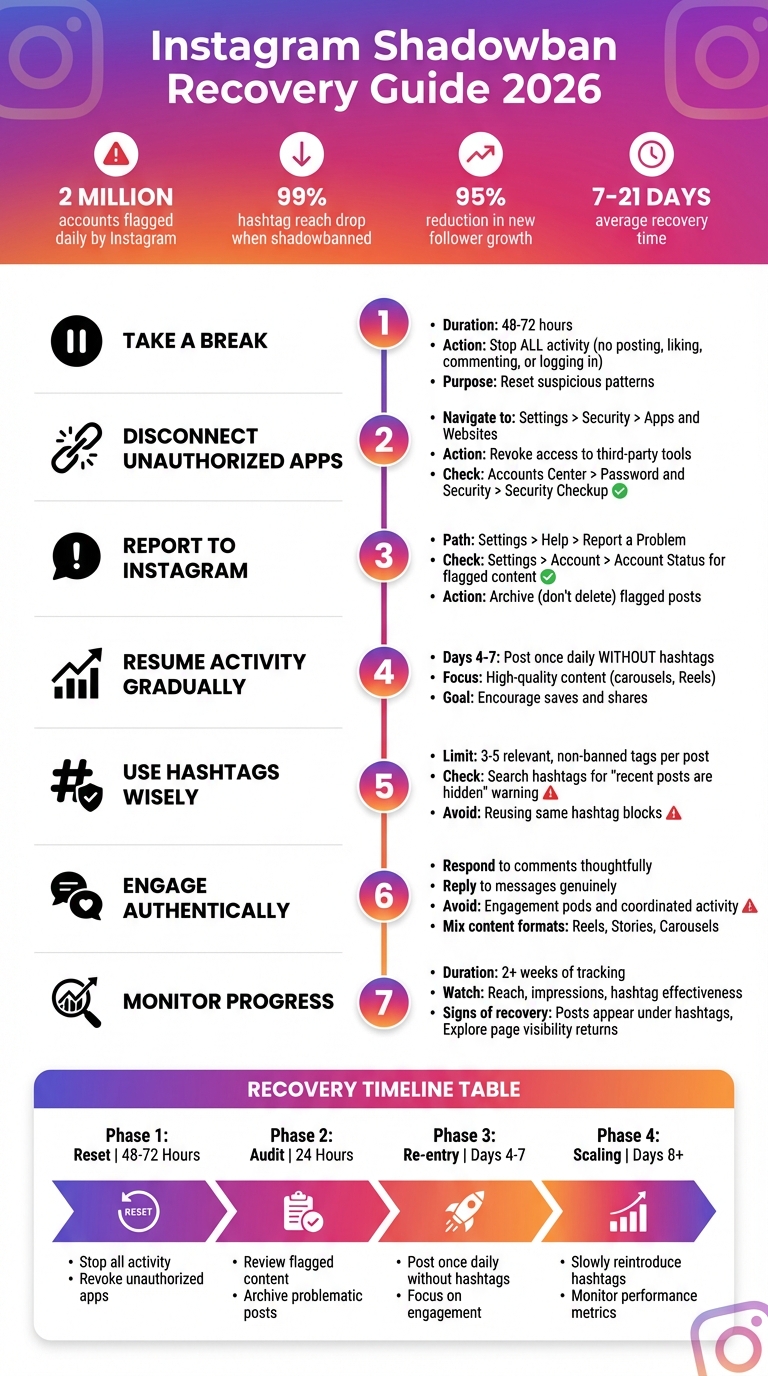
Instagram Shadowban Recovery: 7-Step Process and Timeline
Suspecting a shadowban is frustrating, but confirming it can be even trickier. Instagram doesn’t notify users when it restricts their accounts, so you’ll need to rely on a few manual checks to figure out if your content is being hidden from new audiences.
Thankfully, Instagram’s tools and a handful of straightforward tests can help you identify the issue. Catching a shadowban early can reduce its impact on your account’s growth. Here’s how you can check if your account is shadowbanned.
One of the easiest ways to detect a shadowban is by checking if your posts appear in hashtag searches. Start by creating a post or Reel and use a unique hashtag - something like #YourBrandNameTest2026. Avoid using highly popular hashtags, as your post could naturally get buried under millions of others. After posting, wait 5 to 10 minutes for Instagram to index it.
Next, log into a separate account that doesn’t follow you, search for your unique hashtag, and check the "Recent" tab. If your post doesn’t show up, it’s a strong sign your account is shadowbanned.
When shadowbanned, your content will still be visible to your current followers but hidden from non-followers. This can cause hashtag reach to plummet - often by as much as 99%, dropping from thousands of impressions to fewer than 10.
Instagram Insights can provide clues about a shadowban by highlighting sudden drops in your reach metrics. Open a recent post, tap "View Insights", and scroll to the Reach section. Pay close attention to the breakdown of impressions from followers versus non-followers.
“The most critical data point in Instagram insights is the breakdown of impressions from non-followers, specifically from sources like the Explore page and hashtag search.” - Bitdefender
A healthy post usually reaches 40% to 50% non-followers. If that number falls below 5%, it’s likely the algorithm is suppressing your content. Focus on metrics like "Impressions from Hashtags" and "Explore." If these are near zero while your "From Home" (follower) impressions remain steady, your account might be facing restrictions.
You can also check Instagram’s Account Status tool by navigating to Settings and Privacy > Account Status. If your content is flagged as "Not Recommended", it confirms a restriction. A green checkmark means your content is eligible for recommendations, but subtle penalties might still be affecting your reach.
| Metric | Typical Reach | Shadowbanned Performance | Estimated Drop |
|---|---|---|---|
| Hashtag Reach | 1,000 - 5,000 | 0 - 10 | -99% |
| Explore Page Reach | ~30% of total | 0% | -100% |
| New Followers | 50 - 200/day | 0 - 5/day | -95% |
| Story Views | 500 - 1,000 | 100 - 200 | -75% |
A sudden halt in follower growth is another red flag. If you’ve been gaining 50 to 60 new followers daily and that number suddenly drops to nearly zero - without any changes to your content strategy - it could mean your account has been removed from Instagram’s recommendation system.
Use Instagram Insights to monitor your usual weekly growth and engagement trends. If your content is still reaching your existing followers but fails to attract new ones, it’s a sign that your account is no longer visible to non-followers. Shadowbans can reduce new follower growth by up to 95%.
“If a post that would typically get 40% of its reach from non-followers suddenly gets less than 5%, you have a clear data point showing the algorithm is not distributing your fresh content.” - Bitdefender
Understanding the triggers behind Instagram shadowbans can help you steer clear of them. Instagram's 2026 algorithm uses automated systems to identify behaviors that resemble spam, fake activity, or violations of Community Guidelines. While these safeguards are designed to maintain the platform's integrity, they sometimes mistakenly flag legitimate accounts. Here are the top reasons your account might get shadowbanned.
Using unauthorized apps for mass-following, auto-liking, or auto-commenting is a quick way to get shadowbanned. These tools violate Meta's policies and are easily detected by Instagram's algorithm. In just the first half of 2025, Meta removed about 10 million fake profiles, many of which were linked to automated spam activity.
"Using suspicious apps that create the appearance of fake accounts or inauthentic activity is a direct path to suppression and can harm your visibility in search results." – Adam Mosseri, Head of Instagram
Another risk? Many of these tools require your login details, leaving your account vulnerable to hacking. Compromised accounts are often used for scams or spam, which can immediately trigger a shadowban to protect other users. To stay safe, revoke access to any non-official Meta Partner apps directly through your account settings.
Even without third-party tools, performing actions too quickly - like leaving more than 40 comments in an hour - can mimic bot behavior and set off Instagram's detection systems. If flagged, your account's reach could drop by 40% to 90% overnight, with shadowbans typically lasting between 7 to 21 days.
Using banned or "broken" hashtags - just once - can make your post invisible to non-followers. Before using a hashtag, check if it shows a warning like "recent posts are hidden." If it does, avoid it entirely. As of 2026, some banned hashtags include #pushups, #alone, #brain, #snapchat, and #followforfollow.
Repeating the same block of hashtags across multiple posts can also get flagged as low-quality or bot-like behavior. Similarly, misusing hashtags by tagging irrelevant ones - for example, adding #fitness or #travel to a coffee photo - can make your account seem suspicious and lead to visibility limits.
Instagram is also experimenting with restricting some accounts to just three hashtags per post, signaling a shift toward prioritizing quality over quantity.
Fake interactions - like buying followers, likes, or comments - are another red flag. Instagram's machine learning systems are getting better at spotting fake engagement patterns, even when the activity comes from accounts that appear legitimate.
"If you're using bots or automation software to leave fake comments and likes, you're going to eventually be found out and punished." – Andrew Lee, AndrewLee.Ventures
Engagement pods - groups where members agree to like and comment on each other's posts - are also risky. Instagram's algorithm can detect coordinated engagement and penalize all participants. Additionally, if your content receives a sudden spike in user reports, whether due to a hack or a controversial post, your visibility can drop immediately and without notice.
In 2026, Instagram's algorithm places more weight on early retention metrics like saves and shares, rather than likes or follower counts, when deciding how widely to distribute content. Since fake engagement doesn't improve these key metrics, it's easier for Instagram to identify and suppress accounts relying on purchased interactions.
| Trigger Category | Specific Prohibited Behaviors in 2026 |
|---|---|
| Automation | Using unauthorized apps for growth, auto-DMs, or data scraping. |
| Hashtags | Using banned tags (e.g., #alone, #brain, #pushups), repetitive tag blocks, or irrelevant tags. |
| Engagement | Buying fake followers, joining engagement pods, or mass-liking. |
| Activity Spikes | Posting excessively in a short time or rapid-fire commenting (>40/hour). |
| Content | Sharing unverified health claims, copyrighted music, or borderline suggestive material. |
If you've discovered that you're shadowbanned, don't worry - there are ways to recover. The goal is to reset your account's behavior in Instagram's algorithm and show that you're a genuine, active user. Here's how to do it:
The first step might seem counterintuitive, but it's crucial: stop all activity on your account. That means no posting, liking, commenting, or even logging in for 48 to 72 hours. This pause helps reset any suspicious patterns that may have triggered the shadowban, giving your account a clean slate.
If you've connected any third-party apps to your account - especially those offering automated likes, follows, or comments - it's time to cut them off. These tools can trigger Instagram's algorithm to flag your account.
To remove them, go to Settings > Security > Apps and Websites (or Settings > Account > Apps and Websites, depending on your app version). Review the list of active apps and revoke access to anything you don't recognize or that promises quick follower growth. Afterward, check Accounts Center > Password and Security > Security Checkup to ensure no unauthorized devices are logged in.
Once you've cleaned up your account, let Instagram know about the issue to initiate a review.
Even though Instagram doesn't officially acknowledge shadowbans, you can still request help. Use Settings > Help > Report a Problem to explain your situation. Mention that you've reviewed your account for compliance with Instagram's guidelines. Additionally, check Settings > Account > Account Status to see if any of your posts have been flagged. If you find flagged content, archive it instead of deleting it - it’s a safer option.
After your break, ease back into activity. Start with one high-quality post and avoid hashtags for the first few days. Focus on creating content that encourages meaningful interactions, like saves and shares. For example, try posting an educational carousel or an engaging Reel. Keep your activity natural - limit yourself to one post per day during the first week to avoid triggering Instagram's bot detection.
| Recovery Phase | Duration | Primary Action |
|---|---|---|
| Phase 1: Reset | 48–72 Hours | Stop all activity and revoke unauthorized apps. |
| Phase 2: Audit | 24 Hours | Review and archive flagged content or hashtags. |
| Phase 3: Re-entry | Days 4–7 | Post once daily without hashtags; focus on engagement. |
| Phase 4: Scaling | Days 8+ | Slowly reintroduce hashtags; monitor performance. |
Once you've re-established activity, start using hashtags again - but carefully. Limit yourself to 3 to 5 relevant, non-banned tags per post. Before using a hashtag, search for it on Instagram to ensure it doesn't show a warning like "recent posts are hidden." Avoid reusing the same block of hashtags across multiple posts, as this can look automated. Instead, tailor your hashtags to each post and consider creating a unique, branded tag to track your content's visibility.
During recovery, every interaction should feel natural and genuine. Respond thoughtfully to comments, reply to messages, and interact with your followers in a meaningful way. Stay away from engagement pods or coordinated activity groups, as these can be flagged as inauthentic.
"Shadowbans are a way of Instagram telling your account to 'shut up' - so, if you act responsibly on social media, you won't have that problem."
– Carin Bennett, Social Media Expert
Mix up your content formats - like Reels, Stories, and Carousels - to encourage engagement. Posts that drive saves and shares are especially important since these actions are key to boosting your reach.
Keep an eye on your account's performance metrics, like reach, impressions, and hashtag effectiveness, for at least two weeks. If the shadowban is lifting, you'll notice your reach returning to normal within 7 to 21 days. Check if your posts are appearing under hashtags for non-followers and showing up on the Explore page - these are signs that your visibility is improving.
If there's no progress after three weeks, go back and repeat Steps 1–3. By following these steps, not only can you recover from a shadowban, but you'll also establish better habits to prevent it from happening again.
Once you've recovered from a shadowban, it’s important to take proactive steps to keep your account visible and avoid future penalties. The secret lies in developing habits that align with Instagram’s guidelines while steering clear of actions that might raise red flags with the algorithm.
Instagram’s 2026 algorithm prioritizes meaningful interactions - like saves and shares - over simple likes or vanity metrics. Activities like coordinated follow-for-follow schemes can lead to shadowbans, so it’s best to focus on building real connections with your audience. Make an effort to respond quickly to comments and actively engage with users in your niche.
"The 2025 algorithm shift values early retention and interactivity, like saves and shares, more than simple vanity metrics." - Bitdefender
To encourage meaningful engagement, create high-quality, educational content. Think detailed carousel posts or informative Reels that naturally drive users to save or share. When it comes to staying visible on Instagram, quality content always beats quantity. Alongside fostering authentic interactions, staying informed about Instagram’s policies is equally important.
Instagram’s policies and algorithm updates evolve frequently, so staying informed is essential. Make it a habit to check your Account Status dashboard (Profile > Menu > Account Status) weekly. This tool helps you identify flagged content or determine if your account is eligible for recommendations.
Before posting, double-check the status of any hashtags directly in the app to ensure they’re safe to use. Additionally, follow updates from Instagram’s official channels and Adam Mosseri for the latest platform changes. For example, Instagram now advises placing hashtags in captions rather than comments. Staying informed can help you avoid unintentional violations.
If you’re looking to grow your account, stick to tools that comply with Instagram’s rules. Avoid third-party apps that offer automated likes, follows, or comments, as these can quickly trigger a shadowban. Instead, focus on growth strategies that emphasize authenticity and real follower engagement.
For example, platforms like UpGrow specialize in organic growth while adhering to Instagram’s guidelines. Their AI-driven targeting lets you attract followers based on criteria you set, like location, age, gender, or language. This ensures your growth remains authentic and aligned with Instagram’s policies.
UpGrow also offers features like real-time analytics, profile optimization, and 24/7 growth monitoring to help you build a strong Instagram presence. Plans start at $39/month and include a Growth-Guarantee: if your follower count doesn’t increase, you’ll get your money back - no questions asked. By using compliant tools and focusing on genuine engagement, you can safely grow your account while maintaining its visibility on the platform.
Bouncing back from a shadowban takes patience and a clear plan. Start by pausing all activity for 48–72 hours, deleting any unauthorized apps, and removing banned hashtags from your recent posts. Typically, algorithmic restrictions last between 7–21 days, but in more severe cases, they can stretch beyond 30 days.
To keep your account healthy in the long run, focus on building good habits. Share high-quality content that sparks meaningful interactions like saves and shares. Be mindful of Instagram's daily action limits, and regularly check your Account Status dashboard to spot and address potential issues early.
As SocialRails wisely puts it:
"Instagram restrictions aren't random - they're predictable and preventable." - SocialRails
Authenticity is key. Avoid shortcuts that could jeopardize your account. Stick to these recovery steps to reset your presence and ensure steady, lasting growth.
To figure out if your Instagram account might be shadowbanned, start with the Account Status feature in the app. Head to your profile, tap the menu in the top-right corner, choose Settings and privacy, and then go to Account Status. This section will reveal if any of your recent posts have violated Instagram’s Community Guidelines. If violations are listed, you’ll have the option to appeal, edit, or delete the flagged content.
Another method is to run a quick hashtag test. Create a unique hashtag, like #Test12345, and include it in a new post. Then, either log out or use a different account that doesn’t follow you to search for that hashtag. If your post doesn’t show up in the results, it could mean your account’s visibility is being limited.
Finally, take a close look at your engagement metrics. If you’ve noticed a sudden and sharp drop in your reach or impressions, it might be another clue pointing to a shadowban. These steps can help you determine if your account has been affected.
Instagram shadowbans often occur when accounts engage in activities that the platform flags as spammy or in violation of its Community Guidelines. For instance, sharing prohibited content like hate speech, nudity, or anything else that breaks the rules can quickly result in restricted visibility. If flagged posts are repeatedly edited or deleted, it might even prolong the penalty.
Another common cause is hashtag misuse or behavior that seems automated. Using banned or overly generic hashtags, repeatedly relying on the same tags, or posting too frequently in a short timeframe can raise red flags. Similarly, accounts that engage in rapid follow-and-unfollow patterns or consistently post low-quality content are more likely to face shadowbans.
Compromised accounts - like those hacked to distribute spam or harmful content - are another major trigger for immediate action. To steer clear of these issues, focus on creating genuine, guideline-friendly content, mix up your hashtags thoughtfully, stick to a natural posting rhythm, and ensure your account stays secure.
To steer clear of a shadowban on Instagram, it's important to stay genuine in your activity and adhere to Instagram's Community Guidelines. The platform might reduce your account's visibility if it picks up on behaviors like spamming, using prohibited hashtags, or breaking its rules.
Here are some practical tips to keep your account in good standing:
By following these steps, you can minimize the chances of triggering Instagram's restrictions and help maintain your account's visibility.
Share this post&description=Step-by-step%20guide%20to%20detect%20and%20recover%20from%20Instagram%20shadowbans%3A%20stop%20automation%2C%20fix%20hashtags%2C%20report%20issues%2C%20and%20restore%20reach%20in%207%E2%80%9321%20days.&image=https://www.upgrow.com/blog-images/assets.seobotai.com/cdn-cgi/image/quality=75,w=1536,h=1024/upgrow.com/695aaccf12e0ddc1250c548d-1767563568943.jpg)


