
Avoid Instagram Bans: Risk-Free Automation Tips
Safe Instagram automation for 2026: use official APIs, limit automated actions, spot action blocks and shadowbans, and follow step-by-step recovery advice.
Safe Instagram automation for 2026: use official APIs, limit automated actions, spot action blocks and shadowbans, and follow step-by-step recovery advice.
4.98 /5 - from 58k reviews
Trusted by 50,000+ creators — get real engagement delivered to your profile in minutes, not days.
Instagram automation in 2026 comes with stricter rules than ever, making it easier to get flagged or banned if you're not careful. Here's what you need to know to grow your account safely:
Safe automation combines approved tools with genuine human interaction. Avoid shortcuts, and focus on sustainable growth to keep your account secure.
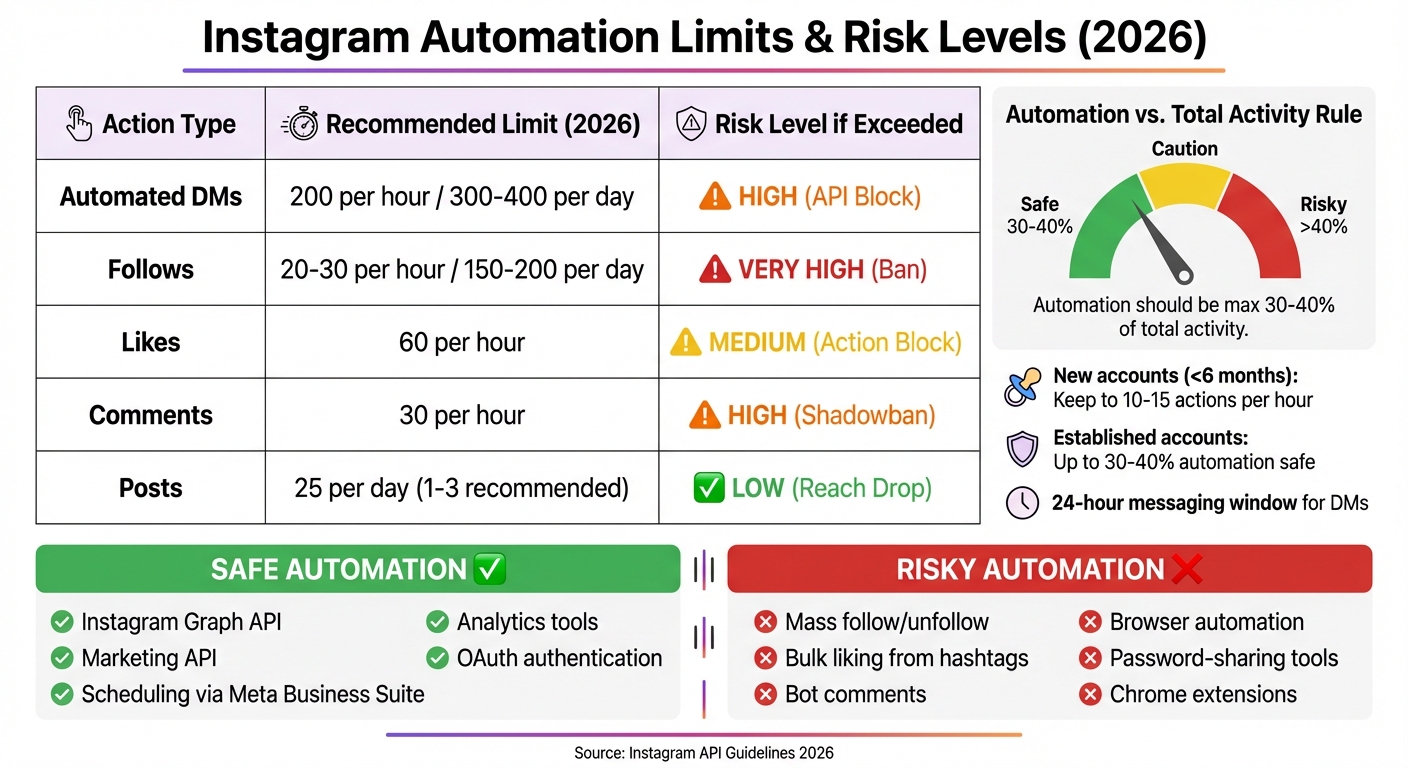
Instagram Automation Limits and Risk Levels 2026
Instagram allows automation, but only if you stick to their official tools like the Instagram Graph API (or verified Instagram growth tools) and Marketing API. Anything outside of that - like browser automation, web scraping, or mobile emulation - is strictly off-limits. The platform separates automation into two categories: "safe" automation (such as scheduling, analytics, and AI-driven direct messages) and "risky" automation (like auto-liking, mass following, or bot-generated comments).
For automated direct messages, Instagram imposes a strict limit of 200 messages per hour per account. There's also a 24-hour messaging window, meaning businesses can only reply to users who have interacted with them recently. When it comes to posting, Instagram suggests up to 25 posts per day, though the sweet spot for engagement is typically 1–3 posts.
Instagram enforces these rules by monitoring "signal quality", penalizing accounts that inflate metrics through practices like engagement pods or buying followers. To stay on the safe side, automation should account for no more than 30–40% of an account's total activity. For newer accounts (less than six months old), automated actions should be kept between 10–15 per hour.
In late 2025, Instagram cracked down hard on unauthorized automation tools, hitting accounts regardless of whether they had verification badges. This wave of enforcement made it clear that Instagram was lowering the threshold for penalties. As one expert put it, "The threshold for what triggers a penalty appears to have lowered". This shift highlighted the importance of following Instagram's updated policies heading into 2026.
Certain automation practices are nearly guaranteed to result in penalties. Actions like mass following/unfollowing, bulk liking (especially from hashtags), and automated comments are red flags. Instagram's systems are designed to detect patterns, such as performing actions at fixed intervals or repeatedly sending identical messages across multiple conversations.
Using unauthorized tools is another surefire way to get banned. Any service that asks for your Instagram password, relies on browser-based bots, or operates through Chrome extensions violates Instagram's terms. Only tools approved by Meta and connected via OAuth (e.g., "Login with Facebook/Instagram") are considered safe.
Cold outreach through automated direct messages is also prohibited. If you send messages to users who haven’t interacted with your account in the past 24 hours, Instagram’s API will flag your activity. Geographic inconsistencies - like logging into an account from multiple distant locations or IP addresses - are similarly flagged as suspicious.
| Action Type | 2026 Recommended Limit | Risk Level if Exceeded |
|---|---|---|
| Automated DMs | 200 per hour / 300–400 per day | High (API Block) |
| Follows | 20–30 per hour / 150–200 per day | Very High (Ban) |
| Likes | 60 per hour | Medium (Action Block) |
| Comments | 30 per hour | High (Shadowban) |
| Posts | 25 per day (1–3 recommended) | Low (Reach Drop) |
Instagram uses advanced tools to identify non-human behavior. By analyzing patterns like interaction speed, repetitive sequences, and unusual timestamps, the platform can pinpoint automation. It also monitors API usage, device fingerprints, and interaction timing to distinguish between real and automated actions.
Since late 2025, Instagram has moved beyond basic rate-limiting. Now, machine learning models assess thousands of behavioral cues, focusing on overall activity patterns rather than isolated actions. Suspicious login behavior - like accessing an account from multiple IP addresses or using browser extensions that require your password - is another red flag.
"Instagram is not eliminating automation. It is narrowing what counts as acceptable use." – Taylor, Guest Contributor, Storrito
Instagram enforces penalties in stages. First, there are action blocks, which temporarily restrict certain activities for hours or days. Next are account restrictions, limiting your reach and hashtag visibility for days to weeks. More serious violations can lead to shadowbans, where your content is hidden from non-followers and hashtags for 14–28 days. Repeated offenses may result in suspension, a full account lockout that can become permanent.
Spotting early warning signs can help you steer clear of permanent account bans. One major clue? If your content stops appearing on the Explore page or in hashtag searches, it’s likely that Instagram has flagged your account.
Another red flag is a sudden drop in engagement. If your likes, comments, and story views plummet, it could mean your account is under some form of restriction. Receiving "Action Blocked" messages when trying to like, comment, or follow is another telltale sign that Instagram’s spam detection has been triggered.
Technical issues can also serve as warnings. Frequent login verifications, prompts about unusual activity, or requests for video selfie biometrics often indicate heightened scrutiny of your account. On top of that, direct notifications about community guideline violations or accusations of coordinated inauthentic behavior may point to potential restrictions.
To keep tabs on your account’s health, check the Account Status option in Instagram’s settings. This feature shows whether your content is eligible for recommendation on Explore or Reels. Since Instagram restricts over 2 million accounts daily - often without sending immediate notifications - regularly monitoring this status is crucial.
Of all the warning signs, shadowbans are among the most serious consequences of restricted activity.
If the early warning signs aren’t addressed, they can escalate into a shadowban. This type of restriction allows your current followers to see your posts but hides them from new audiences. The result? Almost no growth from new viewers, as your posts won’t appear in hashtag feeds or on the Explore page. Accounts under a shadowban typically experience a 99% drop in hashtag reach and lose all visibility on the Explore page.
Want to check if you’re shadowbanned? Post using five niche hashtags, then search for your post from a secondary account that doesn’t follow you. If your post doesn’t show up under those hashtags, a shadowban is likely. Shadowbans usually last 14–28 days, provided you remove any offending content and stop risky behaviors.
Several factors can trigger a shadowban. Using banned hashtags - like #adulting or #alone - is a common culprit. Other triggers include repetitive behaviors, such as identical captions, posting at precise intervals, or replying to comments too quickly. Even posting content with watermarks from TikTok or other platforms can lead to penalties under Instagram’s 2026 algorithm.
| Metric | Normal Account | Shadowbanned Account | Estimated Drop |
|---|---|---|---|
| Hashtag Reach | 1,000–5,000 | 0–10 | -99% |
| Explore Page Reach | ~30% of total | 0% | -100% |
| New Followers | 50–200/day | 0–5/day | -95% |
| Story Views | 500–1,000 | 100–200 | -75% |
If you suspect a shadowban, halt all account activity for 48 hours. This "cooling-off" period signals Instagram’s algorithm that your behavior is genuine. Diversifying your content with fresh Instagram content ideas - by mixing Reels, Stories, and photo posts - can also help you avoid triggering spam filters.
Safe automation is crucial for maintaining Instagram growth without risking account bans. Here’s a look at strategies that prioritize safety and compliance with Instagram's policies in 2026.
Meta provides official tools like the Graph and Marketing APIs, which are the safest way to automate Instagram activity. These tools use OAuth 2.0 for authentication, meaning they never ask for your Instagram password. If an automation tool asks for your username and password directly, that’s a major warning sign - it could jeopardize your account.
Meta Business Suite is a free option offering native scheduling, analytics, and automation features. There are also verified third-party tools, but always check that they adhere to Instagram's official rate limits. Before diving into automation, make sure your account is converted to a Business or Creator profile and linked to a Facebook Business Page. This setup is required to access the official APIs.
Automation should supplement - not replace - genuine human interaction. Striking this balance is key to staying under Instagram’s radar.
Instagram’s AI is designed to flag robotic behavior, so it’s important to vary your activities. For instance, avoid scheduling posts at the same exact times every day. Instead, space them out by several hours and use different time slots. Rotate through at least 30 unique hashtag combinations and avoid reusing captions too often. If you’re new to automation, start with a 60–90 day period of organic Instagram growth strategies to build trust with Instagram’s algorithms. Interestingly, brands that respond to social messages within an hour can see conversion rates up to three times higher than those responding after 24 hours. To stay safe, keep automated actions to no more than 30–40% of your overall activity.
This mix of automation and authentic engagement lays the groundwork for advanced solutions like UpGrow.
UpGrow takes a compliance-first approach to Instagram growth, aligning with the strategies outlined above to ensure safety. It combines advanced AI with human oversight to grow your account organically while adhering to Instagram’s 2026 policies. Rather than relying on mass following or fake engagement, UpGrow focuses on attracting real followers through genuine interactions.
With AI-powered targeting, UpGrow uses filters like location, age, gender, and language to connect with your ideal audience. Human experts oversee these strategies, ensuring they adapt to Instagram’s ever-evolving detection systems. This blend of technology and human input ensures steady, organic growth while keeping your account secure. Plus, UpGrow provides real-time analytics through a live dashboard, giving you full transparency.
If your account faces restrictions despite using safe automation practices, don't worry - most penalties can be resolved. By taking the right steps, you can recover your account and avoid future issues.
Action blocks are temporary restrictions that typically last 24–72 hours, though severe violations might extend this period.
To let the block expire naturally, stop all activity - no likes, comments, follows, or posts - for at least 24–72 hours. Switching to mobile data can also help reset your IP signature.
Here are some technical fixes to try:
Once the block is lifted, ease back into activity. Start with just 10–20 actions per day for the first 48 hours, then gradually increase by about 10% each week.
| Action Type | New Account (<3 months) | Established Account | Per Hour Max |
|---|---|---|---|
| Follows | 100–150/day | 200–300/day | 20–30 |
| Likes | 300–400/day | 700–1,000/day | 50–60 |
| Comments | 50–75/day | 100–200/day | 5–10 |
| DMs | 20–30/day | 50–80/day | 5–8 |
If your account is suspended, you can appeal directly through Instagram. Tap "Learn More", then "Request Review" in the app, or visit help.instagram.com for appeal links. Be sure to include your username, the date of the restriction, and a clear statement affirming your compliance with Instagram's Guidelines. Avoid submitting multiple appeals at once, as it may delay the process.
Instagram might require identity verification. Keep a government-issued ID handy (e.g., passport or driver's license) and, if requested, be prepared to provide a video selfie or a photo of yourself holding a handwritten code. Business accounts may need to supply additional documents like business registration or tax forms.
AI errors sometimes lead to wrongful bans, which are often overturned within 1–2 weeks. Most appeals get a response within 24–72 hours, though more complicated cases might take longer.
After your appeal is processed, follow these steps to rebuild Instagram's trust.
Once your account is restored, take a 48-hour break from all activity to demonstrate your commitment to compliance. Keep in mind, every violation affects your account's internal "trust score", making it more vulnerable to future flags - even for minor actions.
During this downtime:
When you're ready to resume activity, start small. Limit yourself to 10–20 actions per day and vary your posting times. Mix content formats and engage with micro-interactions like saving posts, using story stickers, or participating in polls to show genuine activity.
Stick to the 80/20 rule: automate no more than 80% of your content while dedicating at least 20% to manual, authentic engagement. For the first 7–14 days after recovery, keep your activity minimal. Use only 10–20 actions per day and limit yourself to 5–10 safe hashtags.
| Recovery Stage | Timeline | Key Action |
|---|---|---|
| Phase 1: Total Pause | Days 1–2 | No activity - no likes, posts, or comments |
| Phase 2: Cleanup | Day 3 | Remove flagged content and unauthorized apps |
| Phase 3: Slow Return | Days 4–7 | Post once without hashtags; 10–20 manual actions/day |
| Phase 4: Scaling | Days 8–14 | Gradually increase activity by 10%; use 5–10 safe hashtags |
To avoid triggering high-risk flags, keep your device IDs and IP locations consistent. Frequent changes can make your account appear suspicious. Also, while subscribing to Meta Verified might offer some benefits, it won't shield you from algorithmic penalties or mass bans.
Ultimately, the best way to protect your account is to stick to Instagram's guidelines and maintain activity patterns that appear natural and human. These steps will not only help restore your account but also keep it in good standing moving forward.
Instagram automation is still around, but with stricter rules and smarter AI, detecting fake behavior happens much faster now. Sticking to tools that use official APIs is the safer route, helping you avoid issues like shadowbans, action blocks, or worse by weighing the pros and cons of growth services. On the other hand, browser bots and apps that require password sharing come with serious risks.
"The cost of a flagged account is higher than the cost of slower, compliant growth" - Taylor, Guest Contributor, Storrito
A good approach is to follow the 80/20 rule: automate tasks like scheduling and analytics for efficiency, but keep 20% of your engagement personal and genuine. This mix reassures Instagram that your account is being handled by real people, not just automated scripts. It’s a simple way to ensure steady, secure growth.
For those looking to grow without taking unnecessary risks, UpGrow offers a reliable solution. Their service pairs real human expertise with patented AI to drive organic follower growth, all while staying within Instagram’s rules. Starting at just $39/month and backed by a growth guarantee, UpGrow makes scaling your account both safe and stress-free.
In 2026, Instagram allows automation for tasks like post scheduling, story scheduling, analytics tracking, comment moderation, and hashtag research. These tools can help streamline your workflow while staying within Instagram's rules.
However, auto-following/unfollowing, mass liking, auto-commenting, DM automation, and generating fake engagement remain strictly prohibited. Engaging in these activities risks account bans or other penalties. Stick to tools that align with Instagram’s policies to keep your account safe.
To determine if a tool relies on the Instagram Graph API and is safe to use, check if it explicitly states that it uses the official Instagram Graph API. This ensures it operates within Instagram's rules and limitations. Additionally, confirm that the tool respects Instagram's automation policies - steering clear of fake interactions and strictly following platform guidelines. Make sure the service emphasizes compliance and ethical standards to safeguard your account.
If you think you’ve been shadowbanned, the first step is to immediately stop any automation tools or activities you might be using. These tools can often lead to bans. To check if you’re shadowbanned, see if your posts show up under the hashtags you’ve used. You can also ask someone who doesn’t follow you to search for those hashtags and confirm.
If you confirm the shadowban, take action by avoiding banned or flagged hashtags and carefully review your recent activity. Make sure everything aligns with Instagram’s community guidelines to avoid further issues.


