
5 AI Tools for UGC Video Performance
AI can transform UGC workflows—pair editing automation, repurposing, and smart targeting to boost retention and reach.
AI can transform UGC workflows—pair editing automation, repurposing, and smart targeting to boost retention and reach.
4.98 /5 - from 58k reviews
Trusted by 50,000+ creators — get real engagement delivered to your profile in minutes, not days.

User-generated video content (UGC) thrives on platforms like TikTok, Instagram Reels, and YouTube Shorts. The right AI tools can help you improve retention, engagement, and conversions while saving time on tedious tasks. Here's a quick overview of five powerful AI tools for UGC creators:
Each tool caters to specific needs, from editing automation to audience targeting. Whether you're repurposing content, refining visuals, or growing your reach, these tools offer practical solutions for boosting UGC performance.
CapCut has become a favorite editing tool for creators producing high volumes of user-generated content (UGC). Its AI suite is designed with one clear goal: take care of the repetitive tasks so creators can focus on the parts that require their creative input.
While CapCut doesn't offer standalone analytics, it uses performance signals to guide its AI editing tools. The AI Auto-Edit (AutoCut) feature reviews footage for factors like audio clarity, facial expressions, and framing. It then selects the best segments and arranges them into a preliminary cut. This helps maintain viewer retention by cutting out weaker moments that might cause audiences to lose interest. Combine this with Auto Captions, which transcribes spoken audio into styled subtitles with an accuracy rate of 94–96% for clear English speech, and you have a solid solution for the many viewers who watch videos without sound. This approach makes editing more efficient from the start.
Auto Captions alone can cut subtitling time for a 10-minute video from 30–45 minutes down to under 10 minutes. Similarly, AI Auto-Edit saves another 10–15 minutes per rough cut. Over the course of a day producing five videos, these time savings really add up.
The AI Background Removal tool allows creators to swap out backgrounds in talking-head videos. However, it may struggle with fast-moving or complex scenes, performing at about a 7/10 rating. It's always a good idea to manually review auto-generated captions, especially when dealing with brand names or industry-specific terms, as the AI can occasionally misinterpret these.
CapCut also simplifies the process of reusing content with specialized tools. The Long Video to Shorts feature is particularly handy, allowing creators to break down a 10-minute video into multiple shorter clips for platforms like Instagram Reels or TikTok. The AI Voice Generator is another useful tool, turning text scripts into voiceovers. This is ideal for faceless videos or when localized content is needed, avoiding the hassle of re-recording.
For creators working at scale, the "Efficiency Cascade" method can be a game-changer. This involves creating one polished video, duplicating the project, and then swapping out footage while keeping the same timing, style, and effects intact.
CapCut also makes it easier to optimize content for different platforms. Smart Reframe transforms standard 16:9 footage into a 9:16 vertical format, tracking facial movements to keep subjects centered. This feature can save 20–30 minutes per video and is rated 8/10 for multi-platform repurposing. To get the best results, shoot with your subject in the center third of the frame when filming in landscape mode, giving the AI more flexibility for cropping.
Beat Sync is another standout tool, automatically aligning cuts with music - a key factor for boosting retention on platforms like TikTok and Instagram Reels. AI-optimized Reels have been shown to increase engagement rates to 12.3%, compared to 8.7% for traditional edits.
For those looking to unlock even more features, CapCut Pro is available for $7.99/month. This includes 4K exports, watermark removal, and access to the full AI suite. However, core tools like Auto Captions, Smart Reframe, and Background Removal remain free on the desktop app.
OpusClip transforms long-form videos into short clips at scale, making it a favorite among podcasters, educators, and UGC creators. With over 16 million users and more than 172 million clips produced as of 2026, it’s a powerful tool for repurposing content efficiently.
OpusClip uses an AI Virality Score to evaluate each clip on a scale from 0 to 100. This score factors in hook strength, emotional flow, and alignment with trends. Clips scoring above 75 have been shown to achieve approximately 2.3× more views on average compared to those scoring below 50. Powered by GPT-4, this feature helps predict how well a clip will perform.
Turning a 30-minute video into multiple clips takes just about 90 seconds. The platform auto-generates animated captions with around 97% accuracy for clear audio. It also removes filler words, cleans up audio with a single click, and inserts AI-driven B-roll, which can increase clip retention rates from 28% to 41%. These features make content repurposing faster and more efficient.
"It used to take days to create clips. Now it takes us minutes to create them." - Lewis Howes, Creator
OpusClip’s ClipAnything 3.0 model can analyze a variety of content types, including vlogs, gaming videos, and footage with minimal dialogue. It identifies key moments by examining visual cues, emotional peaks, and transcripts. Creators can guide the AI with plain-language prompts like, "Find the part where they discuss pricing", to locate specific segments quickly. Pro tip: Trim any dead air from your video before uploading, as credits are calculated based on the source length.
OpusClip simplifies platform-specific adjustments, such as auto-reframing to keep the active speaker centered in formats like 9:16, 1:1, and 16:9. You can customize fonts and captions to align with your branding. The platform also supports one-click publishing and scheduling for TikTok, Instagram Reels, YouTube Shorts, and LinkedIn, complete with auto-generated titles and hashtags.
Pricing starts with a Free plan at $0 per month, which includes 60 minutes of processing with watermarks. The Pro plan, billed annually, costs about $14.50 per month and offers 300–600 minutes of processing, AI-driven B-roll, and direct publishing.
Now operating as quso.ai, Vidyo.ai is an all-in-one Social Media AI platform relied upon by over 4 million creators and marketers. Initially launched as a video clipping tool, it has evolved to include features like AI avatars and advanced analytics, making it a go-to choice for creators aiming to scale their content production.
Vidyo.ai takes analytics to the next level with its AI Virality Score, which predicts how well clips will perform on platforms like TikTok, Instagram Reels, and YouTube Shorts. What sets it apart is the integration of this score into its Viddy AI Assistant, which can create tailored content such as SEO-friendly blog posts, LinkedIn updates, and show notes. These insights feed directly into its editing tools, creating a seamless workflow.
Vidyo.ai’s editing tools are designed to save time and effort. Features like IntelliClips scan long-form videos to find the most engaging moments automatically, while CutMagic handles scene detection for multi-camera edits and split-screen layouts with 90% accuracy. These tools dramatically speed up editing. The platform also supports AI-generated subtitles in over 20 languages with an accuracy rate of about 85%, and its filler word removal tool cleans up speech effortlessly. Users have reported as much as a 200% boost in video creation speed.
"With quso.ai, we cut down monthly editing time from 200 to 80 hours." - Ree Hurkan, Founder, ReeAnimate
Vidyo.ai excels in helping users repurpose content for greater reach. For example, Alessandro Cecere, Marketing Manager at Luxor, grew their YouTube subscriber count from 6,000 to 15,000 in just a few months by turning long-form videos into short clips. Wendy Richmond, CEO of Results Matter Dental Marketing, shared her success: "My YouTube views skyrocketed 2,000 times after using quso.ai".
Staying true to its end-to-end functionality, Vidyo.ai ensures your content is optimized for each platform. It automatically adjusts aspect ratios - like 9:16 for TikTok or 1:1 for LinkedIn - and applies your Brand Kit (logos, fonts, colors) across all clips without extra effort. The built-in Social Media Scheduler allows you to publish directly to more than seven platforms with just one click, even optimizing post timing for your audience.
Pricing options include a Free plan starting at $0/month (75 credits, 720p resolution, watermarked exports), the Essential plan at $19/month (1080p resolution, filler word removal), and the Growth plan at $25/month (billed annually), which includes custom branding and access to the Viddy AI Assistant.

Runway transforms existing video footage by changing its style and feel without the need for reshoots.
At the heart of Runway's editing tools is Edit Studio, which uses the Aleph 2.0 model introduced in May 2026. This tool applies edits made to a single frame across the entire video sequence, eliminating the need for manual keyframing.
This feature is particularly helpful for user-generated content (UGC). For instance, you can easily change product colors, tweak outfits, or remove distracting logos while keeping the original lighting, motion, and surroundings untouched. The object removal tool is highly effective, delivering professional results in about 92% of cases.
Aleph 2.0 also ensures consistency across multiple shots, automatically applying edits throughout scene changes in a single pass. Additionally, Runway offers generative restyling, allowing users to transform a video's look with simple text prompts like "dark anime style" or "winter version", eliminating the need for manual design work.
Before committing to a full video transformation, you can use the keyframe preview feature in Edit Studio to inspect the static frame edits. This approach saves both time and editing credits. Edit Studio charges 28 credits per second of footage, with a minimum usage of 56 credits.
These tools make it easy to prepare videos for platform-specific enhancements.
Runway integrates seamlessly with tools like Adobe Firefly, simplifying the transition to professional editing software such as Premiere. This integration allows for quick formatting, captioning, and sound design.
For short-form platforms, Runway offers the Extra Motion text prompt feature, which adds physics-based effects like liquid pouring or fire spreading that weren’t part of the original footage. These motion effects can make a big difference. Studies show that intentional and predictable motion patterns in short videos can boost completion rates by 34%. Runway's Gen-4.5 model also supports native output up to 1440p, providing better quality for UGC on high-resolution screens.
Before diving in, keep in mind that Edit Studio has some requirements: source videos must be between 2 and 30 seconds long, have a resolution between 480p and 1080p, and include no more than 10 cuts. Pricing starts at $20/month for 25 minutes of video generation, with the Standard plan available at $80/month for 125 minutes.
UpGrow uses AI to help you grow a targeted, organic Instagram following while improving the reach and performance of your Reels and video posts. Its focus is on connecting your content with viewers who are genuinely interested.
With UpGrow's Live Analytics Dashboard, you get real-time insights into follower growth, engagement rates, and overall profile performance. The platform’s AI Smart Targeting takes it further by filtering audiences based on niche, location, age, gender, and language. This ensures your videos are seen by the people most likely to interact with your content.
These analytics play a key role in shaping strategies that enhance Instagram engagement.
Designed specifically for Instagram, UpGrow doesn’t just analyze your content’s performance - it actively optimizes how your Reels and Stories are delivered. The platform prioritizes attracting organic, high-quality traffic, which helps build a strong engagement history and boosts your visibility over time.
Pricing starts at $59/month for standard AI targeting. For faster growth and advanced targeting, plans are $99/month, while the $179/month option offers maximum growth and dedicated support. UpGrow has earned a 4.8/5 rating on Trustpilot, with users often highlighting the quality of followers and the detailed insights provided by the analytics dashboard.
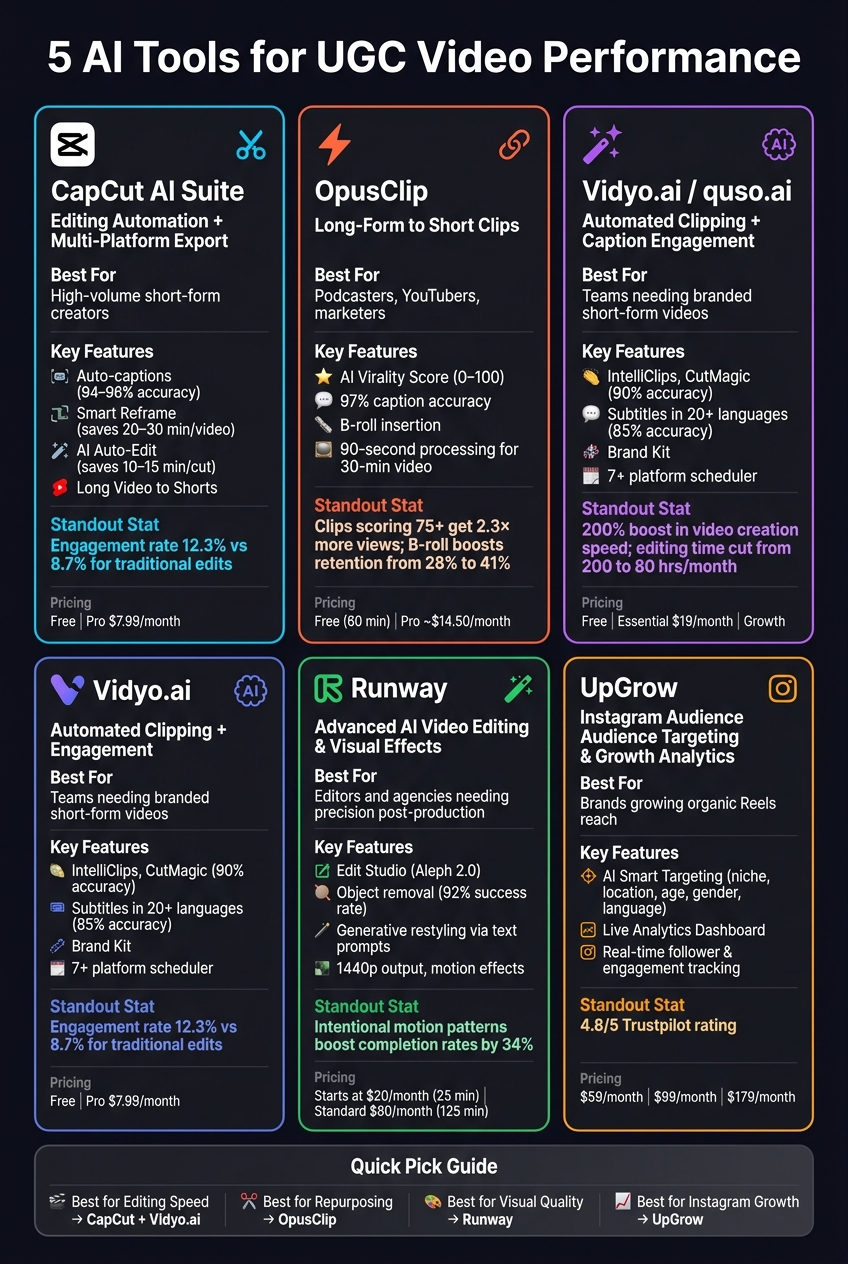
5 Best AI Tools for UGC Video Performance: Features, Pricing & Use Cases
Each of these tools tackles a unique aspect of the UGC video process. Here's a breakdown to help you decide which one suits your needs best:
| Tool | Primary Use Case | Best Fit For | Key Performance Benefit |
|---|---|---|---|
| CapCut AI Suite | Editing automation + multi-platform export | Creators producing large volumes of short-form video | Auto-captions, templates, and one-click resizing for TikTok, Reels, and Shorts |
| OpusClip | Transforming long-form video into short clips | Podcasters, YouTubers, and marketers repurposing content | AI clip scoring to predict top-performing moments |
| Vidyo.ai | Automated clipping + caption-driven engagement | Teams needing branded short-form videos quickly | Smart scene detection paired with branded captions and layout presets |
| Runway | Advanced AI video editing and visual effects | Editors and agencies requiring precise, high-quality post-production | Features like background removal, inpainting, and motion tracking for visual refinement |
| UpGrow | Instagram-specific audience targeting and growth analytics | Brands and creators aiming to grow organic Reels reach | AI Smart Targeting filters by niche, location, age, gender, and language to boost engagement |
These tools excel in different scenarios. CapCut and Vidyo.ai are ideal for quick editing and fast delivery of short-form content. OpusClip shines when repurposing extensive raw footage into shareable clips. For those focused on high-end video production, Runway offers advanced editing capabilities. Meanwhile, UpGrow is perfect for creators and brands looking to optimize their content for Instagram and reach the right audience effectively.
Each AI tool serves a specific purpose when it comes to tackling challenges in UGC video creation. CapCut AI Suite simplifies the process of editing and resizing videos for multiple platforms, making it a go-to for high-volume short-form content. OpusClip specializes in turning lengthy recordings into bite-sized, shareable highlights, while Vidyo.ai focuses on maintaining consistent quality across scaled content.
For creators who need more precision and refined visuals, Runway delivers advanced control that basic tools might lack.
If growing your Instagram audience is your main goal, UpGrow is tailored for that. Its AI Smart Targeting allows you to filter by niche, location, age, gender, and language, ensuring your Reels connect with the right viewers. Plans start at $39/month, offering a targeted solution for audience engagement and growth.
The key takeaway? No single tool is a one-size-fits-all solution. The best strategy is to pair tools with your specific needs - whether that’s speeding up production with editing tools or using analytics-driven platforms like UpGrow to maximize your reach.
To streamline your content strategy, begin with an AI platform that integrates discovery, production, and performance analytics all in one place. Choose tools that can automate content collection using hashtags or mentions, while also simplifying tasks like tagging and managing rights. Platforms offering AI-driven insights make it easier to pinpoint top-performing themes, cut out the guesswork, and concentrate on scaling content that boosts both engagement and conversions efficiently.
To keep viewers around, you’ve got to make those first 1.5 seconds count. Start with pattern interrupts - things like sudden visual changes or shifts in energy every 2–3 seconds. These grab attention and keep it locked in.
AI can be your secret weapon here. Use it to test different hooks, scripts, and captions quickly, then tweak based on audience data. Dive into retention graphs to spot where viewers drop off and adjust your content to address those weak points.
High-density formats, like greenscreen overlays, are also a smart move. They not only keep the audience engaged but also show algorithms that your content delivers value.
The best way to grow real Instagram followers with UpGrow is by leveraging its AI-powered service, designed to avoid bots and fake accounts entirely. UpGrow zeroes in on your ideal audience by using filters like location, age, and interests. Plus, it strictly follows Instagram’s guidelines, ensuring your account stays safe. With advanced targeting features and real-time performance tracking, you can focus on building authentic, organic connections with users who genuinely care about your content.


