
AI Storyboarding for Instagram: Key Features
Compare top AI storyboard tools for Instagram Reels—features like character consistency, 9:16 optimization, style options, and export/editing workflows.
Compare top AI storyboard tools for Instagram Reels—features like character consistency, 9:16 optimization, style options, and export/editing workflows.
4.98 /5 - from 58k reviews
Trusted by 50,000+ creators — get real engagement delivered to your profile in minutes, not days.
AI storyboarding tools simplify video pre-production by turning text prompts into visual sequences. These tools save creators up to 90% of planning time, optimize content for Instagram's 9:16 format when you make Reels on Instagram, and ensure visuals stay consistent across scenes. With features like character consistency, style options, and flexible editing, platforms like Boords, Katalist AI, Shai, and LTX Studio cater to creators aiming for polished, scroll-stopping Instagram Reels. Here's a quick breakdown:
Each tool offers unique strengths for Instagram creators, from solo influencers to agencies managing multiple projects.
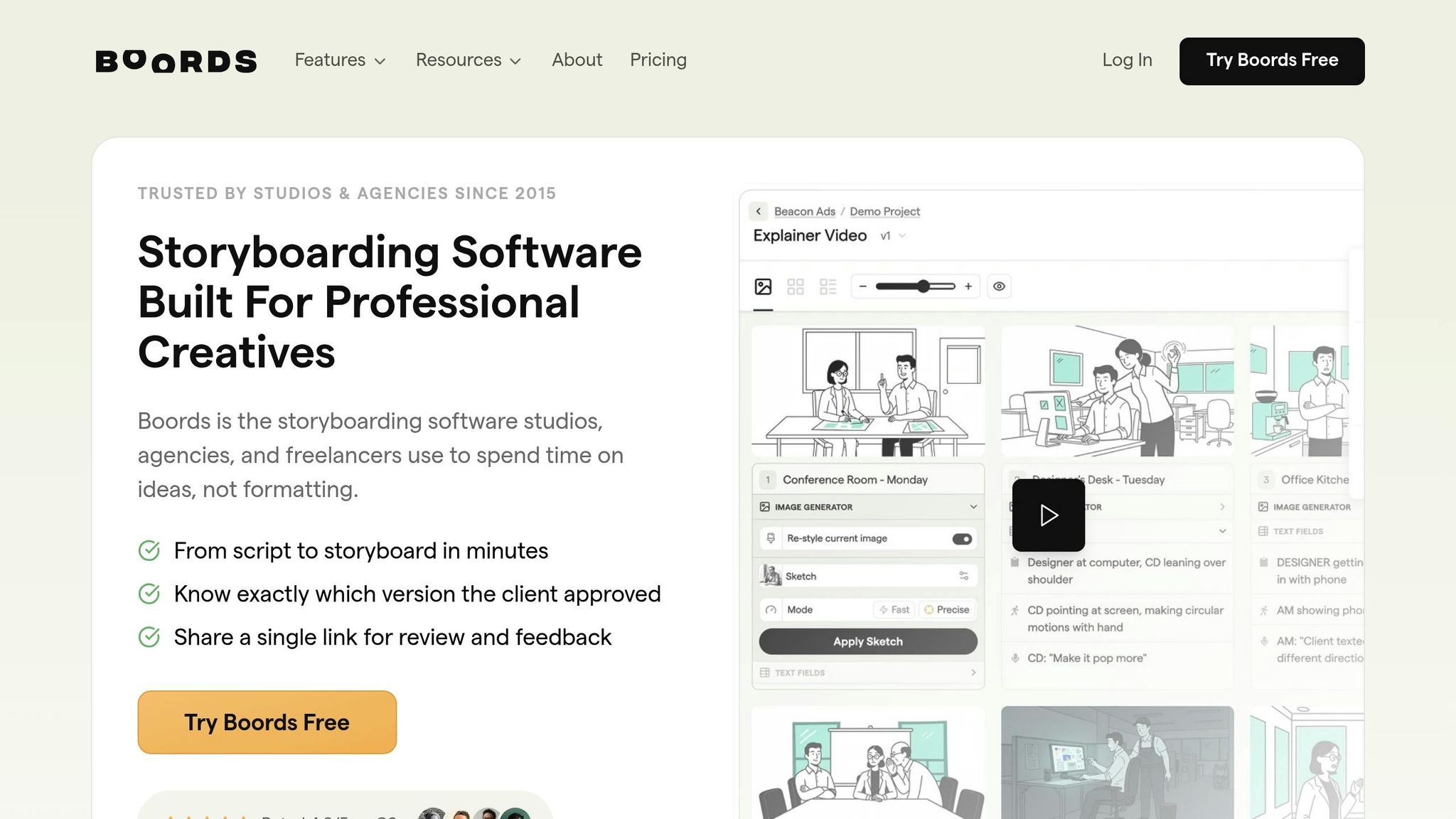
Boords is trusted by over 1,000,000 creatives and boasts an impressive 4.8/5 rating on G2. It offers two modes for generating visuals: Fast (15–30 seconds) and Precise (45+ seconds, paid).
With its Precise mode, Boords excels at sticking closely to prompts and matching styles. You can fine-tune the composition by specifying camera framings like Close-up, Mid-shot, Wide shot, Aerial, or angles from above or below. Reference images act as visual guides, ensuring consistent quality across frames instead of relying solely on text-based prompts. Plus, you can generate unlimited preview variations for free, with credits only deducted when an image is added to the storyboard.
Boords’ Cast Images feature automatically identifies characters from imported scripts and creates reference images to ensure they look the same across all frames. To improve context understanding, start prompts with "Show me" (e.g., "Show me the character walking through a forest"). For Instagram Reels or multi-scene projects, which are essential for growing your audience with Reels, you can enable the "Auto-generate Cast Images" option during script import to prevent unwanted character changes between scenes.
The platform offers a range of styles, including sketch, vector, and realistic options. It supports multiple aspect ratios: Portrait (9:16) for Stories and Reels, Square (1:1) for standard posts, and Social (4:5) for optimized feed posts. With Character Guidelines, you can maintain consistency across any chosen art style.
Boords’ Frame Editor lets you double-click on AI-generated images to draw, annotate, add shapes, or place text directly on the canvas. Camera move overlays - like zooms, pans, and tilts - help indicate motion within static frames, working seamlessly with detailed framing controls to preserve composition. The Script Editor syncs updates in real-time across all storyboard frames, so you can manage text without needing to open each frame individually. Export options include PDFs, PNG sequences, and MP4 animatics, perfect for polishing your social media previews.
"Before Boords, storyboarding was time-consuming and technical. Now I can focus exclusively on creative decisions and make my work better!" - Scott Rice, EP & Director, Two Shot West
With its extensive features, Boords sets a high standard for AI-powered storyboarding tools.
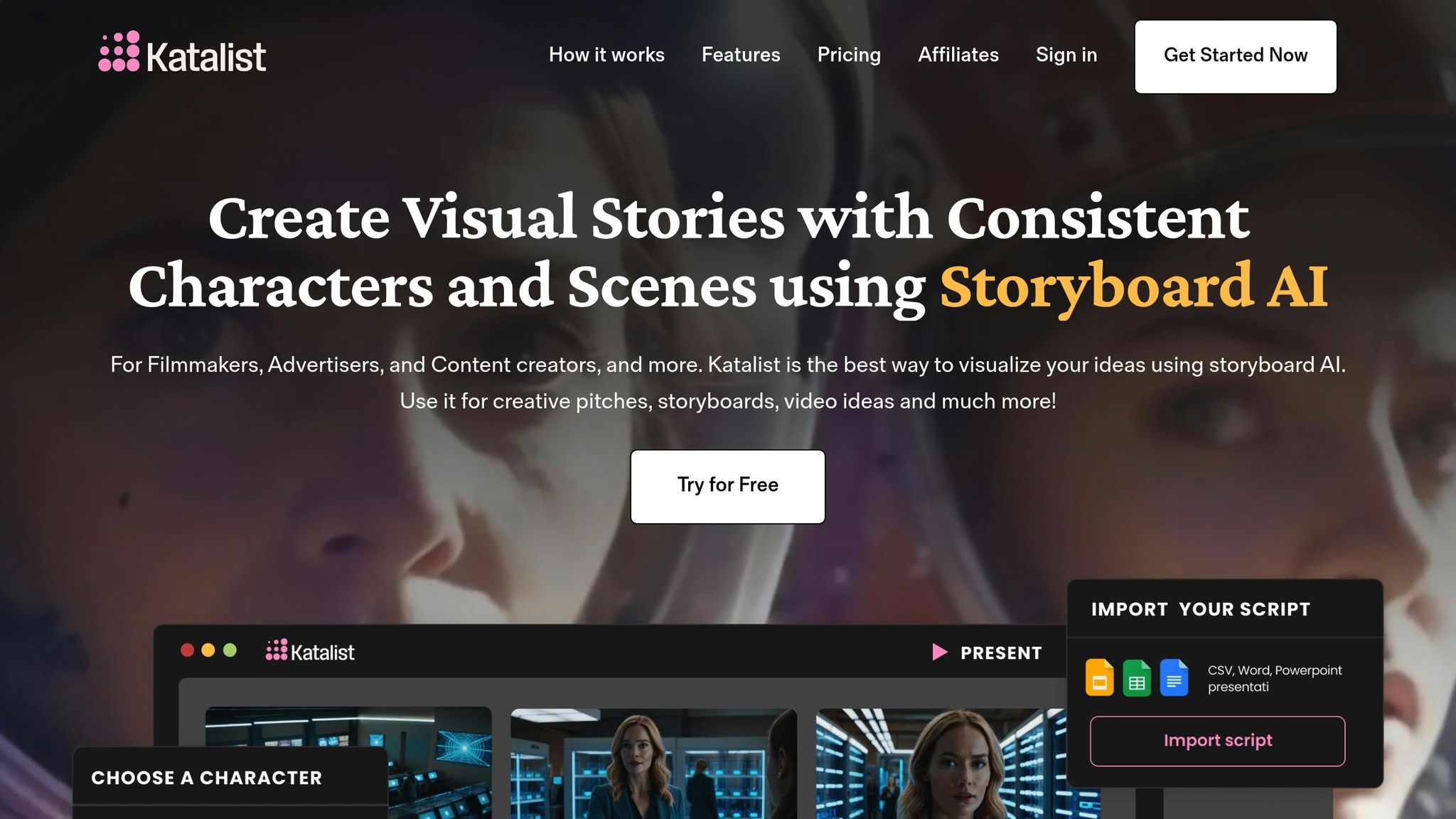
Katalist AI simplifies the process of creating storyboards for social media creators, much like Boords. Designed for platforms like Instagram, TikTok, and YouTube, it transforms scripts into frame-accurate storyboards in less than 5 minutes, cutting pre-production time by 50%. Let’s break down its features to see how it supports creators on Instagram and beyond.
Katalist AI uses "Cinematic Realism" and "Cinematic" styles to produce high-quality, professional visuals tailored for social media. These styles are optimized for vertical formats, ensuring content looks polished and engaging. Its Generative Fill tool refines backgrounds, fixes flaws, and fills in gaps, allowing Instagram creators to focus on generating content rather than spending hours on edits.
One standout feature is its AI-driven modeling, which maintains consistency in characters' facial features, outfits, and props throughout the storyboard. Creators can even upload their own photo to ensure the main character remains uniform across scenes. Publicis Groupe Slovenia adopted this technology in January 2026, and according to Art Director Jasna Vejselovic, the tool halved their production time while doubling creative output.
"Katalist cut our pre-production time in half. It's like having an extra set of hands that instantly brings my vision to life." – Jordan Lee, Creative Director, Stellar Productions
Katalist AI offers a wide range of art styles - 10 in total - including Sketch, Cinematic, Comic Book, Cartoon, and Illustration. It supports various aspect ratios such as vertical for Instagram Reels and TikTok, landscape for YouTube, and square for Instagram posts. This versatility ensures creators can align their storyboard style with their brand identity, all within the same tool.
The platform’s editing capabilities are robust. Its Agentic AI Assistant allows for precise adjustments, like changing a car’s color or tweaking camera angles. The Posing Tool gives creators control over character positioning, while professional camera settings let users modify shot types (close-up, wide, medium) and angles (eye-level, above, or below). For added convenience, storyboards can be exported in various formats - ZIP files, PDFs, PowerPoint presentations, or MP4 videos. Pro plan users ($59/month) can even integrate directly with Adobe Premiere Pro.
Shai is all about aligning with the director's vision, delivering a storyboard that's ready for production in under an hour - perfect for Instagram creators working against the clock. Unlike tools like Boords and Katalist AI, Shai emphasizes giving directors precise control, with detailed adjustments to match their creative goals. Plus, it offers a free tier that covers the first six scenes, making it a great starting point for those new to AI-driven storyboarding.
Shai ensures top-notch image quality by letting creators define key details upfront. Parameters like camera height, focal length, background elements, time of day, and mood are set before the frames are generated. The platform even suggests professional camera setups, including angles (wide, close-up, over-the-shoulder), shot sizes (extreme close-up, medium close-up, wide shot), and movements (pan, tilt, dolly, arc), to create a polished, cinematic look. If a frame doesn’t hit the mark, the Regenerate feature allows for quick redrawing. For added precision, creators can use cues like "late afternoon sun through blinds" to nail the lighting.
To keep everything visually cohesive, Shai offers a casting panel where creators can choose characters from its library - like "Elba" - to maintain consistent wardrobe and traits across scenes. This attention to detail is especially important for keeping Instagram Reels visually engaging as viewers swipe through.
Shai also tackles format-specific needs, supporting the vertical 9:16 layout required for Instagram Reels and Stories, so creators don’t have to worry about awkward cropping. It provides multiple export options, including PDFs, image sets, detailed shot lists, and shareable links. For production teams, the one-click shot list generation is a huge time-saver.
With Shai's Editor View, creators can tweak camera angles, shot sizes, movements, and environmental details even after the storyboard is generated. This flexibility makes pre-production up to 100× faster and cuts costs by 78%.
LTX Studio brings Hollywood-level visuals to creative teams, serving over 135,000 users with its professional AI tools. The platform incorporates FLUX.2 for 4MP image realism, Google Veo 2 and Veo 3 for cinematic video sequences, and Kling 2.6 Pro to help Instagram creators craft stunning visuals [29, 30, 34]. Academy Award-winning filmmaker Taika Waititi praised its speed, saying: "It's amazing how fast it can generate ideas - it can accelerate the whole creative process".
Here’s a closer look at how LTX Studio refines the storyboarding process:
LTX Studio delivers exceptional image quality, thanks to its FLUX.2 model, which generates 4MP images with professional-grade detail. With "Gen Space", users can tweak frames using text prompts or image references, while advanced environmental controls adjust lighting, weather, and camera movements to create authentic UGC-style visuals - all without complicated commands [29, 30, 33]. Upscaling tools ensure images remain crisp, even in vertical formats.
The platform's "Persistent Character Profiles" and "Elements" system help maintain consistent character traits throughout scenes [30, 34]. Pierre-Jean Bernard, Head of Digital & AI at L'Oréal–McCann Paris, praised this feature, saying: "What we like about LTX is the consistency, so you can create your own universe". However, consistency may falter in complex scenes with extreme angles or dramatic lighting.
LTX Studio offers a range of preset visual styles, from photorealistic and 3D to cinematic and sketch [30, 32]. Users can also upload style references to align with specific brand aesthetics, a feature especially helpful for maintaining a cohesive Instagram presence. Integrated tools for color grading and weather adjustments allow creators to fine-tune the mood of their content [32, 34].
Designed with Instagram creators in mind, LTX Studio optimizes content for formats like Reels, Stories, and posts. The "AI-powered Instagram tools" includes aspect ratio customization for vertical layouts (9:16). Exports come in MP4 format and can include fully designed PDF pitch decks containing visuals, synopses, and cast profiles [31, 33, 35]. The platform’s Timeline Editor and Sound Design tools make it easy to move from storyboard to a polished video with music and voiceovers - all within one web-based interface [30, 31].
The "Shot Video Editor" allows frame-level adjustments, enabling creators to modify angles, objects, or expressions without regenerating the entire scene [32, 33]. The "Retake" feature lets users tweak dialogue or emotions in specific moments, while the Brush Tool refines objects and lighting without altering the entire frame [36, 32]. For dynamic camera movements, users can choose the handheld preset or set keyframes for effects like crane lifts or orbital rotations [29, 34]. On the Standard plan ($35/month), users receive 28,800 computing seconds, which typically supports 15 to 25 short video sequences per month.
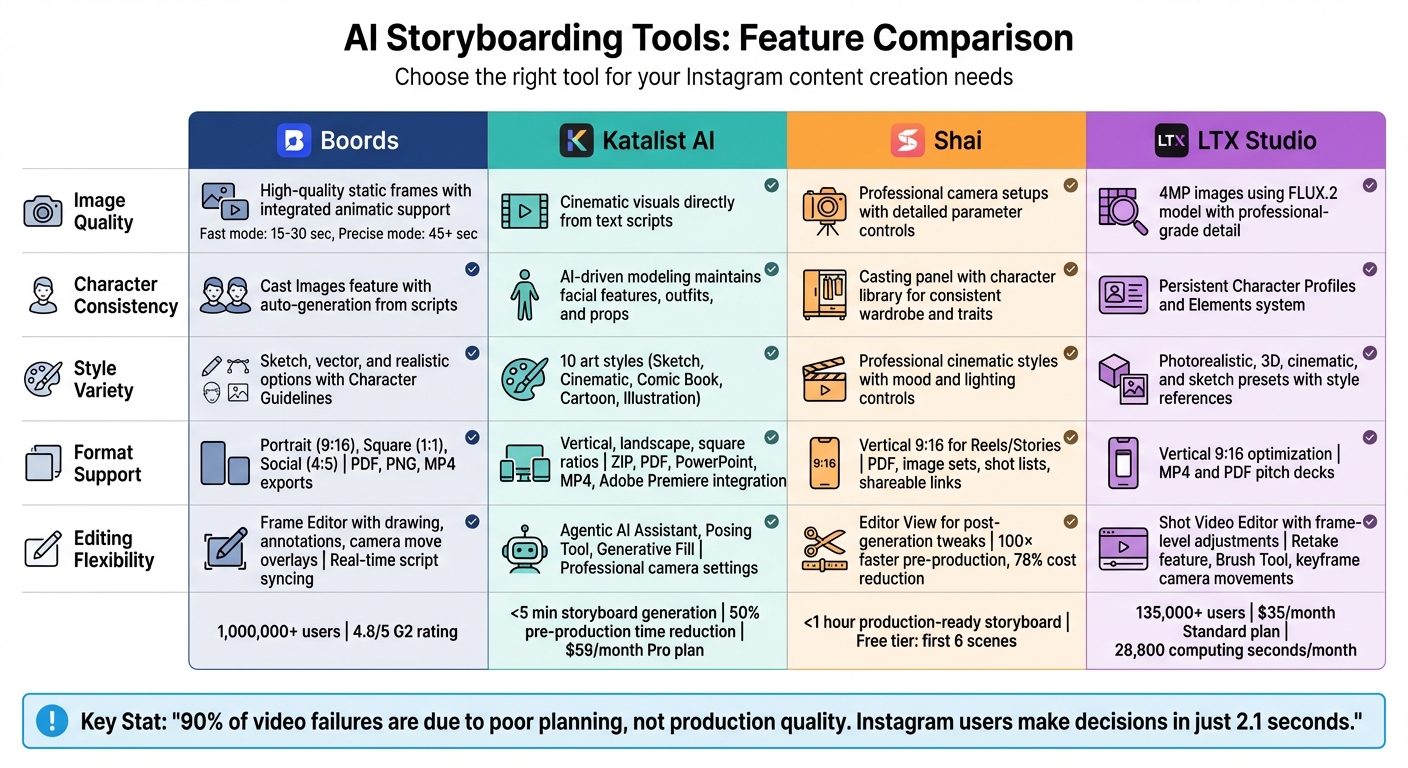
AI Storyboarding Tools Comparison: Boords vs Katalist AI vs Shai vs LTX Studio
When it comes to producing user-generated content (UGC) videos efficiently, understanding the strengths and limitations of each AI storyboarding tool is a game-changer for creators. Each tool offers its own set of benefits, along with some trade-offs, especially for Instagram content creation. Below is a table that breaks down the key criteria for three popular tools, helping you see how they stack up against each other.
| Criteria | Boords | Katalist AI | LTX Studio |
|---|---|---|---|
| Image Quality | Delivers high-quality static frames with integrated animatic support | Produces cinematic visuals directly from text scripts | Generates high-quality visuals using FLUX and Nano Banana models |
| Character Consistency | Relies on manual, template-based consistency | Ensures consistent character rendering throughout the storyboard | Uses automatic tagging for characters and objects to maintain consistency |
| Style Variety | Offers customizable templates for a range of projects | Supports cinematic, documentary, and influencer styles | Provides a wide variety of styles using multiple AI models |
| Format Support | Exports to PDF, MP4, and shareable links | Outputs high-quality videos directly from storyboards | Supports vertical 9:16 layouts, MP4 files, and PDF pitch decks |
| Editing Flexibility | Features a drag-and-drop interface with customizable note fields | Includes tools like a Posing Tool and Generative Fill for tweaks | Enables manual refinement of scenes and shots for detailed edits |
This table highlights each tool's unique approach, giving you a clear picture of how they perform in critical areas like image quality, style options, and editing capabilities. Whether you value cinematic visuals, diverse style options, or advanced editing tools, there's a solution tailored to your needs.
Looking at the standout features of top AI storyboarding tools, it’s clear each one caters to different needs in Instagram content creation. The best choice for you depends on the type of content you produce and how you like to work.
If you're an influencer or solo creator, tools like Shai offer quick results with free scene options that save time. For brands that need polished, on-brand content, Boords provides structured, high-quality outputs, while Katalist AI delivers a cinematic touch. Small businesses without dedicated creative teams can take advantage of the templates offered by these tools, and agencies juggling multiple clients will appreciate the collaboration features in platforms like Boords or LTX Studio's all-in-one production suite.
Statistics back up the importance of pre-production: 90% of video failures are due to poor planning, not production quality. And since Instagram users make decisions in just 2.1 seconds, grabbing their attention within those first three seconds is non-negotiable. Tools that prioritize vertical-first planning with a 9:16 aspect ratio and safe-zone awareness ensure your visuals won’t get blocked by Instagram’s interface.
The takeaway? Careful pre-production is key. As Leslie from GStory.ai notes:
"In 2026, the creators who win on Reels won't be the ones who use the most AI - they'll be the ones who use AI well, and then put their own voice back on top".
A smart approach is to follow the 80/20 rule: let AI handle 80% of the work - like clipping, subtitling, and generating basic scenes - while you focus on refining the pacing and adding your personal touch to keep the content feeling human.
When selecting an AI storyboarding tool, prioritize platforms that align with your specific goals for visual planning, automation, and usability. Consider tools that offer features like detailed reference support, script input, or scene suggestions to enhance your creative process. Some tools are designed for crafting polished, production-ready storyboards, while others focus on simplifying quick visualizations and automating scene creation. Make sure the tool you choose integrates seamlessly into your workflow to keep your process smooth and efficient.
When it comes to keeping your characters consistent across scenes, focus on defining their key features. This includes elements like face structure, hairstyle, outfit, and their overall style or vibe. Making too many changes to these elements at once can confuse your audience or disrupt the flow of your story.
To stay on track, tools like reference images or a character bible can be incredibly helpful. These act as a visual guide, ensuring your character looks and feels the same throughout your storyboard or video. Consistency isn't just about visuals - it helps your audience stay connected to the story you're telling.
When designing a 9:16 storyboard for Instagram, it's crucial to keep all key elements, like captions, within a 1080 × 1420 pixel safe text zone. This ensures your content remains visible across various phone sizes and avoids interference from UI overlays.


