
How to Add UGC to Instagram Captions
Learn how to collect, get permission for, credit, and adapt UGC into authentic Instagram captions that increase engagement and trust.
Learn how to collect, get permission for, credit, and adapt UGC into authentic Instagram captions that increase engagement and trust.
4.98 /5 - from 58k reviews
Trusted by 50,000+ creators — get real engagement delivered to your profile in minutes, not days.

User-generated content (UGC) is one of the most effective ways to make your Instagram captions stand out. Why? Because people trust real experiences shared by others more than polished brand content. In fact, 81% of consumers find UGC more trustworthy than traditional marketing, and 85% rely on it before making a purchase.
Here’s how you can start using UGC in your captions:
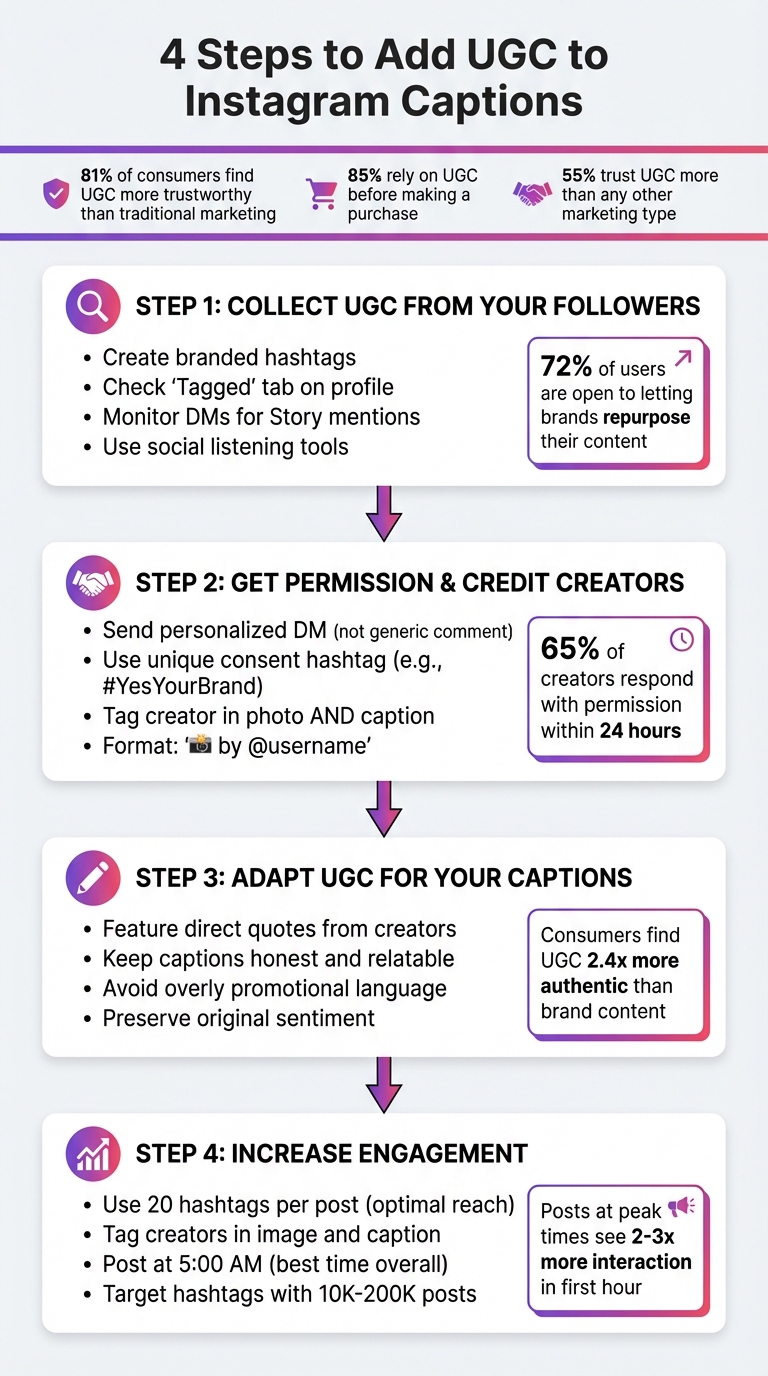
4-Step Process for Adding User-Generated Content to Instagram Captions
Before adding user-generated content (UGC) to your captions, you need to gather it. Here's the good news: 72% of users are open to letting brands repurpose their content for marketing. That means most of your followers are likely to be on board. The trick is to make it easy for them to create content and simple for you to find it.
The easiest way to get UGC? Just ask. Start by creating a branded hashtag and featuring it prominently in your bio. A memorable hashtag, like #MyMorningAtBrightBean for a coffee shop, works much better than a generic one like #coffee. It’s not only catchy but also helps you track posts.
Take it a step further by including the hashtag on receipts, emails, and captions. You can also directly reach out via DMs, comments, or email to explain how followers can tag your account. Be specific - something like, “Tag us in your Stories using the @mention sticker,” makes the process clear and reduces confusion.
When you share high-quality UGC that reflects your brand’s vibe, your audience will naturally follow suit. You can even run themed campaigns, such as “Customer Review Friday,” to create a steady stream of engaging content instead of posting sporadically.
Once the UGC starts rolling in, the next step is to organize and save the best of it.
After your followers start creating content, you’ll need a system to keep track of it all. Start with the basics: check the "Tagged" tab on your profile for posts where users have tagged your account. Don’t forget to monitor your DMs for Stories that mention your brand - since Stories disappear in 24 hours, save any standout videos right away.
Another key step is regularly searching your branded hashtag to discover fresh posts. While browsing, use Instagram’s Save feature to create a special “UGC Potential” collection. For untagged content, social listening tools like SEMRush or Hootsuite can help you catch brand mentions that might otherwise slip through the cracks.
Here’s a quick breakdown of where to find UGC and how to use it:
| Method | Best For | Where to Find It |
|---|---|---|
| Branded Hashtags | Building community & campaigns | Instagram Search bar |
| Account Tags | High-quality grid posts | "Tagged" tab on your profile |
| Story Mentions | Capturing real-time reactions | Instagram Direct Messages |
| Social Listening | Finding untagged brand mentions | Third-party tools (e.g., SEMRush) |
Respecting creators' rights is a must when using UGC (user-generated content) in your Instagram captions. Here's the deal: you cannot repost someone else's content without their permission - the original creator automatically owns the copyright. Instagram's Terms of Service make it clear: you need to have the rights to anything you post. Skipping this step can lead to legal trouble and harm your brand's image. Just ask Duane Reade. The drugstore chain faced a $6 million lawsuit from actress Katherine Heigl after sharing a paparazzi photo of her without permission.
Here's some good news: 72% of users are open to letting brands share their content, and 65% of creators respond with permission within 24 hours. Most creators appreciate being asked, especially when the request feels personal.
The best way to ask is through a direct message (DM), not just a generic comment on their post. Personalization shows you value their work.
"It's important to go the extra mile and send a DM to the creator, instead of just leaving a generic comment on their post. Remember that you're asking permission to use a creator's work - it's worth sending them a personalized note!" - Nikki Canning, Editorial Manager at Later
When crafting your message, keep it friendly and specific. Compliment the content you want to use, explain how and where you plan to feature it (Instagram feed, Stories, website, etc.), and make it simple for them to agree. For instance: "Hi! We love your latte art photo. May we share it on our Instagram feed and tag you? Reply with #YesCoffeeShop to confirm."
Using a unique hashtag for consent is a smart move. Brands like Airbnb and PetSmart use hashtags like #AirbnbPhoto or #yespetsmart to document approval. This approach creates a clear record of permission, protecting both you and the creator.
If you're dealing with a lot of UGC, consider linking to a Terms of Use page in your Instagram bio where creators can formally agree to your terms. Just avoid using shortened URLs like bit.ly in comments - Instagram might flag them as spam.
Once you've secured permission, the next step is giving proper credit. This strengthens trust and shows appreciation for the creator's work.
After getting permission, it's essential to give credit where it's due. Tagging the creator in both the photo and the caption is a simple but effective way to show respect. When you tag them in the image, their post appears in the "Tagged" section of their profile, which boosts engagement and highlights their contribution. In the caption, make their handle visible - don’t hide it at the bottom among hashtags.
A straightforward format works best: "📸 by @username" or "Loving this shot from @username!" Place it near the top of your caption so it's easy to spot. If the creator has specific crediting preferences, make sure to ask during your permission request.
For Stories, use Instagram's "Add This to Your Story" feature. If you plan to save it to your Highlights, get separate permission.
Crediting isn’t just about following etiquette - it’s about building trust. When creators see you respecting their work, they’re more likely to collaborate with you again and encourage others to do the same. Proper permission and crediting don’t just protect your brand legally; they also help you build a loyal, engaged community.
Transform user-generated content (UGC) into Instagram captions that feel genuine and align with your brand. Why? Because consumers find UGC 2.4 times more authentic than brand-created content. The key is to keep that natural vibe intact while subtly incorporating your brand’s message.
Using direct quotes from creators can bring a level of authenticity that standard brand copy just can’t match. Instead of simply reposting a photo, highlight the creator’s unique experience. For instance, you might quote a customer saying, "This completely transformed my morning routine!" and tag their handle for added recognition.
Brands like Calvin Klein and Knix have mastered this approach. Calvin Klein’s famous #mycalvins campaign generated a staggering 872,642 pieces of UGC by spotlighting real customer quotes and stories in their captions. Similarly, Knix created a dedicated Instagram Stories Highlight, "#YouInYourKnix", to celebrate customer contributions with captions that embraced body positivity and diversity.
Another way to adapt UGC is by turning reviews from platforms like Twitter or review sites into engaging Instagram captions. Pair these with visuals or Reels that match your brand’s personality. If you’re promoting a product, try this formula: introduce the product, explain its benefits, showcase the UGC or review, and finish with a clear call to action (CTA).
A great example of this strategy is Starbucks’s "Red Cup Contest". Starbucks encouraged followers to design their own holiday red cups and share their creations on Instagram. The brand then used captions to tell the story behind each design, making customers feel like an integral part of their holiday campaign.
But remember, keeping your captions honest is just as important as making them creative.
Trust is everything when it comes to UGC. In fact, 55% of consumers trust UGC more than any other type of marketing. To maintain that trust, avoid captions that feel overly promotional or forced. Instead, focus on relatable messaging. Use UGC to showcase your product in everyday situations rather than relying on hard-sell tactics.
"User-generated content is the word-of-mouth equivalent on social media." – Nikki Canning, Editorial Manager, Later
A small gesture like thanking the creator can go a long way in building community and authenticity. For example, instead of saying, "Check out this amazing photo," try something warmer like, "We’re blown away by @username’s creativity - thank you for sharing this with us!" This approach feels more personal and genuine.
It’s also important to preserve the original sentiment of the UGC. If a customer loves your product because it’s soft, don’t dilute their enthusiasm with corporate jargon. Share content from a diverse range of users to make your brand feel more inclusive and relatable. Highlighting various perspectives helps show that your brand values real people, not just polished influencers.
Finally, avoid being too pushy with sales language. Instead of saying, "Buy now and get 20% off," let the UGC speak for itself. A caption like, "This is why we do what we do 💙 Thanks for sharing, @username!" feels genuine while still encouraging engagement. When done right, UGC can be incredibly effective - 80% of consumers say it influences their purchasing decisions.
Once you've crafted authentic UGC captions, the next step is making sure they get noticed. The secret? Smart posting strategies that combine precise tagging with perfect timing. Here's how to make your content stand out.
Tagging the original creators in both the image and the caption can significantly extend your reach. When they share your post to their Story using the "Add This to Your Story" feature, it creates a clickable sticker linking back to them. This simple action can spark a ripple effect, exposing your content to a broader audience.
When it comes to hashtags, research suggests that 20 hashtags per post deliver the best reach. Use a mix of tags, including location-based, branded, industry-specific, community-focused, and descriptive ones. The sweet spot for hashtag popularity is between 10,000 and 200,000 posts. Overly popular hashtags (those with more than 1 million posts) can bury your content, while ultra-specific ones (fewer than 1,000 posts) might not attract enough attention. Whether you place hashtags in your caption or the first comment, both methods work equally well.
Once your tags and hashtags are in place, timing becomes the next crucial factor for boosting engagement.
The first hour after posting is critical. High engagement during this window signals Instagram to promote your content beyond your immediate followers. Posts published during peak engagement times can see 2-3x more interaction in that first hour.
Data from 2026, analyzing over 6 million Instagram posts, reveals that 5:00 AM is the best time to post. Posting early means less competition and the chance to capture users during their initial scroll of the day. However, it's essential to check your Instagram Insights (Profile > Insights > Total Followers > Most Active Times) to identify the best times for your audience.
Different types of content shine at different times. For example:
Midweek days like Wednesday and Thursday tend to have the highest engagement, while Saturday often lags behind.
If your followers are spread across time zones, aim for global peak times, such as 12:00 PM–2:00 PM UTC, to reach morning users in the U.S. and evening users in Europe. To stay organized, you can schedule posts up to 75 days in advance using Meta Business Suite.
When incorporating user-generated content (UGC) into your captions, it's essential to stay aligned with your brand's identity while keeping your audience engaged. These tips will help you strike the perfect balance.
It's easy to see UGC as a creative free-for-all, but maintaining a consistent brand voice is critical. A cohesive identity builds trust and ensures your feed feels polished rather than chaotic.
Balance is key - mix professional product shots with UGC, and maintain visual harmony by using your brand's colors, logos, and templates when resharing content in Stories. Keep in mind that Millennial and Gen Z audiences are quick to spot content that feels overly "salesy". To avoid this, consider creating a UGC style guide. This guide should outline your brand's personality and include examples of acceptable language and tone. For instance, if your brand voice is casual and fun, make sure your captions and chosen UGC reflect that vibe.
Diversity in content is equally important. Highlighting a variety of user experiences makes your brand relatable to a broader audience. A great example is GoPro, which has turned customer content into a cornerstone of its marketing. By encouraging users to share high-quality action footage through daily photo challenges and the GoPro Awards, the company has built a thriving community. In fact, as of September 2025, GoPro's top three YouTube videos - submitted by its customers - had amassed over 420 million combined views.
"No one tells our story better than our members. The Well Traveled community is the key here. Whenever we can let their experiences shine, we do." - Laura DeGomez, Director of Partnerships & Brand Marketing, Well Traveled
Staying true to your brand voice not only builds trust but also sets the foundation for expanding your audience.

To fully leverage UGC, you need a growing, engaged audience. After all, 85% of consumers rely on UGC before making a purchase. A larger follower base means more UGC creators and stronger social proof for your brand. Enter UpGrow.
UpGrow is an AI-driven Instagram growth tool designed to help brands attract genuine followers. By using advanced targeting filters like location, age, gender, and language, UpGrow connects you with users who align with your brand. Its real-time analytics and live dashboard provide instant feedback, allowing you to fine-tune your UGC strategy as you go.
With a free trial and a Growth-Guarantee (you get your money back if you don’t see growth), UpGrow is an affordable way to expand your audience. Plans start at just $39/month, making it an accessible option for brands looking to amplify their UGC efforts while building a loyal, engaged community.
By following the steps outlined above, you now have a clear path to creating Instagram captions that feel real and foster a strong sense of community. Incorporating user-generated content (UGC) is a highly effective way to build trust, connection, and engagement around your brand. The stats back this up: 85% of consumers rely on UGC before making a purchase, and 81% trust it more than polished, branded content. When customers share their honest experiences with your product or service, it creates a ripple effect of digital word-of-mouth recommendations that ads simply can’t match.
The advantages go beyond just trustworthiness. Featuring UGC transforms your Instagram into a gathering place where your followers feel seen and valued. It’s also a budget-friendly approach - using content from your fans saves on costly photo shoots while delivering posts that resonate more authentically with your audience. In fact, consumers are 2.4 times more likely to perceive UGC as authentic compared to content created by brands.
Start putting these ideas into action. Create a branded hashtag, ask permission to share your followers’ content, and write captions that celebrate their real-life experiences with your brand. Always credit the original creators, and be sure to maintain your brand’s tone and style throughout. Refer back to this guide whenever you need a refresher on how to collect, adapt, and amplify UGC effectively.
To take your UGC strategy to the next level, focus on growing an engaged audience that’s excited to create content about your brand. Tools like UpGrow can help you achieve this by using AI-powered targeting to connect with followers who genuinely align with your brand. With plans starting at $39/month and a Growth-Guarantee, it’s a cost-effective way to nurture the kind of community that keeps the UGC flowing.
Get started today and watch your engagement and community loyalty grow!
Encouraging your audience to share user-generated content (UGC) starts with making them feel appreciated and connected. Invite them to tag your brand in their posts or use a branded hashtag, then highlight their content on your profile as a way of showing gratitude. This kind of recognition often inspires others to get involved.
Another way to boost participation is by running contests or giveaways where followers are rewarded for sharing content tied to your brand. Keep the instructions simple and encourage genuine, personal stories to make it easy for people to join in. By regularly interacting with and showcasing their contributions, you build a cycle of engagement that naturally encourages more UGC over time.
Using user-generated content (UGC) without permission can lead to serious legal trouble. The content’s original creator holds the rights to their work, and using it without their consent could result in copyright infringement or even breach privacy laws.
To steer clear of these risks, always get clear, explicit permission from the creator before using their content. Doing so not only keeps you on the right side of the law but also demonstrates respect for their efforts and helps build trust with your audience.
To make the most of user-generated content (UGC) in your Instagram captions, start by inviting your audience to tag your account or use a branded hashtag when they post. This makes it simple to discover their content and showcase it on your profile. Hosting contests or themed campaigns is another great way to encourage followers to create and share content tied to your brand.
When you share UGC, always credit the original creator - it’s a small gesture that goes a long way in showing appreciation. Adding a personal touch to your captions can make the post feel more genuine and relatable. Don’t stop there - engage with your audience by liking, commenting on, or sharing their posts. This interaction strengthens connections and can inspire others to join in.
These steps not only boost engagement but also help build a sense of community and trust around your brand.


