
Real-Time Alerts for Viral Content
Act on engagement spikes in minutes with real-time alerts, AI insights, and automated boosts to increase Instagram visibility and viral reach.
Act on engagement spikes in minutes with real-time alerts, AI insights, and automated boosts to increase Instagram visibility and viral reach.
4.98 /5 - from 58k reviews
Trusted by 50,000+ creators — get real engagement delivered to your profile in minutes, not days.
Want your Instagram posts to gain traction fast? Timing is everything. Posts that perform well in the first 30-90 minutes after publishing have a better chance of going viral. Real-time alerts can help you act quickly when engagement spikes, ensuring you don’t miss opportunities to amplify your reach.
Instagram’s algorithm prioritizes engagement velocity - how quickly users interact with your content. Early likes, shares, and comments signal value, pushing your post to Explore and Reels feeds. Tools like UpGrow provide instant alerts and actionable insights to help you respond during these critical moments, boosting your chances of success.
With tools like UpGrow, you can monitor your performance 24/7 and make data-driven decisions to grow your Instagram presence effectively.
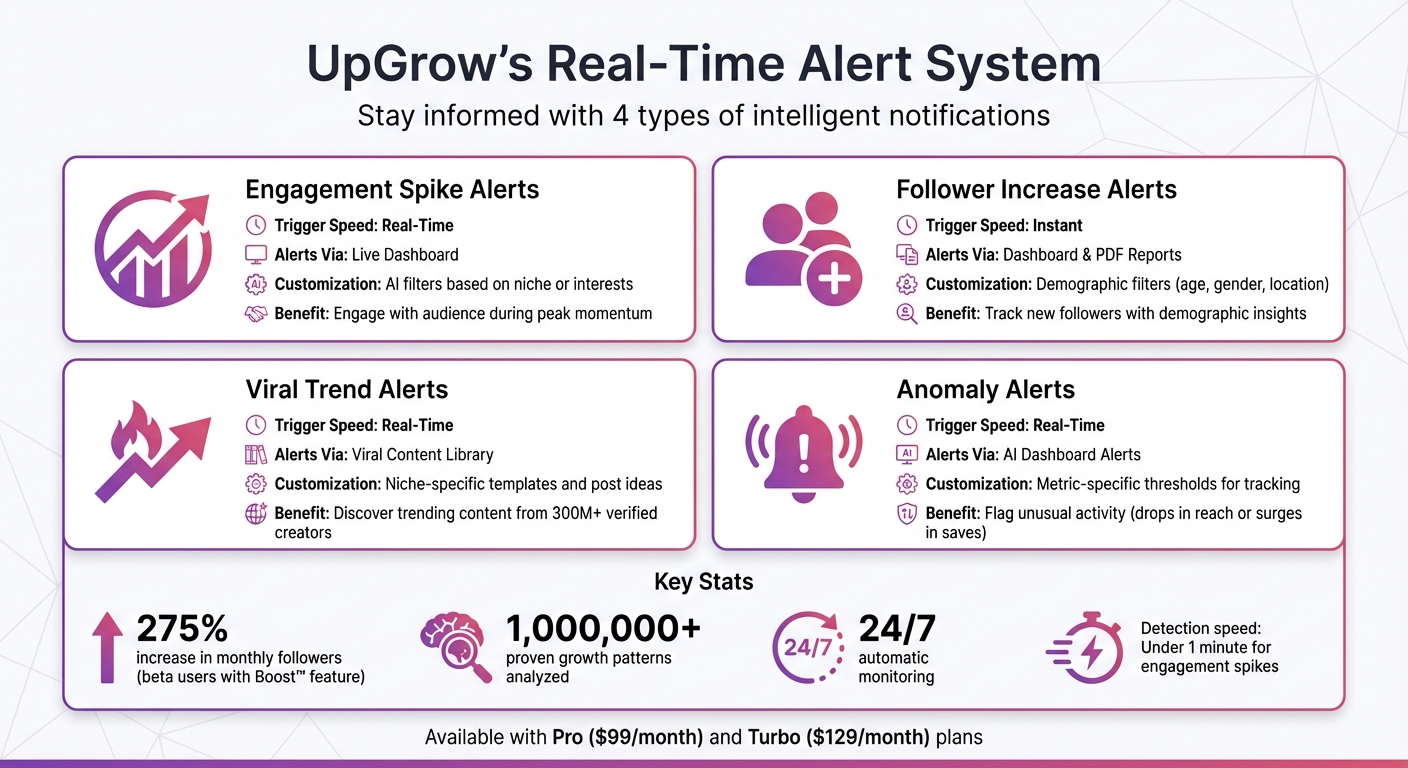
UpGrow Real-Time Alert Types and Features Comparison
UpGrow combines AI-driven monitoring with human expertise to provide real-time alerts whenever your content starts gaining traction. Its live growth dashboard gives you instant access to metrics like follower growth, engagement rates, and content performance. This setup ensures you receive actionable insights as they happen, making it easier to track and respond to trends effectively.
With data drawn from over 1,000,000 proven growth patterns, UpGrow identifies opportunities that might go unnoticed with manual monitoring. For instance, beta users of the AI-powered Boost™ feature reported a 275% increase in monthly followers by leveraging optimal engagement windows. The platform doesn’t just alert you to trends - it also highlights which aspects of your content are driving results, so you can focus on strategies that work. This system supports a suite of targeted real-time features designed to keep your growth on track.
UpGrow offers four types of real-time alerts to ensure you’re always informed about key activity on your account:
| Alert Type | Trigger Speed | Alerts Via | Customization Options |
|---|---|---|---|
| Engagement Spikes | Real-Time | Live Dashboard | AI filters based on niche or interests |
| Follower Increases | Instant | Dashboard & PDF Reports | Demographic filters (age, gender, location) |
| Viral Trends | Real-Time | Viral Content Library | Niche-specific templates and post ideas |
| Anomaly Alerts | Real-Time | AI Dashboard Alerts | Metric-specific thresholds for tracking |
You can fine-tune these notifications with filters for location, age, gender, language, interests, and hashtags, ensuring that you only receive updates about engagement that aligns with your target audience. This way, you're focusing on interactions that are more likely to convert into loyal followers rather than irrelevant activity.
UpGrow’s capabilities go beyond notifications. Its AI analyzes visuals, captions, and hashtags to predict which posts are likely to go viral, helping you proactively plan your engagement strategies. According to Social Ninjas from UpGrow:
"AI turns Instagram posting from guesswork into data-driven strategy, predicting which visuals, captions, hashtags, and timings will spark viral engagement."
- Social Ninjas from UpGrow
The platform operates around the clock, offering 24/7 monitoring. Integrated with the Boost™ tool, UpGrow uses advanced pattern recognition to amplify your growth automatically. Even when you’re offline, your account is working to maximize reach - all while staying fully compliant with Instagram’s guidelines, thanks to its human-assisted AI approach that avoids the risks of traditional growth bots.
Start by logging into your UpGrow account through the web dashboard or mobile app. Once inside, head to the Growth tab in the main menu. From there, select Growth Settings to access the configuration panel. This is where you can fine-tune how and when you’ll receive notifications, setting the stage for quick, effective responses to drive your strategies forward.
To make the most of real-time actions, tailor your alerts to focus on the engagement that matters most. UpGrow’s advanced targeting tools allow you to filter alerts by hashtags, location, demographics, and interests, ensuring you only get notified about content that aligns with your brand’s goals. For example, in the "Followers Targeting" section, you can add hashtags like #FitnessChallenge or #WorkoutMotivation to keep tabs on trending topics within your niche.
If location is key for your brand, you can select specific geographic areas using dropdown menus. Whether you’re targeting the entire country or narrowing it down to specific cities, UpGrow makes it easy with its radius-based targeting (measured in miles). This is especially helpful for building a strong local presence. Additionally, demographic filters let you define age ranges (e.g., 18–34), gender preferences (male, female, or any), and language options to match your audience. For instance, a beauty brand might set up alerts for English-speaking women aged 18–35 engaging with makeup tutorials in major U.S. cities.
Once your alerts are customized, it’s time to choose how you want to receive them. UpGrow offers email, SMS, and in-app push notifications, giving you the flexibility to pick what works best for you. In the notification settings panel, you can toggle between these delivery methods and adjust the frequency. Whether you prefer instant alerts for engagement surges or a daily email summary of key performance metrics, the platform has you covered.
UpGrow’s 24/7 automatic monitoring ensures you’re always in the loop. It detects engagement spikes in under a minute, so you can act fast when something starts trending. You can even test your setup with sample alerts to make sure everything is functioning perfectly before going live. This system integrates seamlessly with UpGrow’s AI-powered dashboard, helping you stay on top of trending content in real time.
Taking quick action can be the difference between a post going viral or fading into obscurity. Instagram's algorithm favors content that achieves high engagement right after posting, making the first hour absolutely critical. When you receive an alert, respond to comments within the first 60 minutes. This interaction signals to Instagram that your post is driving genuine conversations, encouraging the platform to show it to more users. This increased exposure improves your chances of landing on the Explore page. These timely responses, powered by real-time alerts, are key to growing your Instagram presence effectively.
If your post starts gaining traction, don’t let the momentum slip. Create a follow-up Reel within 24 to 48 hours. Instagram’s algorithm often favors subsequent posts after a successful one, giving you an opportunity to ride the wave of increased visibility. You can also use the "reply with a Reel" feature to respond to comments on your viral post. This keeps the engagement flowing and introduces new ways for your audience to interact with your content while your original post is still trending.
The lifespan of viral content is short - on Instagram, trends typically peak within 7 to 10 days. Using UpGrow's notifications, act fast by resharing your trending post to Stories to boost views and interactions. Replying to comments and using tools like Reels can create multiple points of engagement. Keep your Stories concise - limit them to five slides to maintain high viewer retention. Add clear calls-to-action, such as "Share this with a friend" or "Save for later", to encourage further interaction and signal value to the algorithm.
Another smart move? Look for trending audio tracks with the arrow icon and fewer than 10,000 uses. These tracks give you the chance to hop on a trend early, before it becomes oversaturated. Neil Patel, Co-Founder of NP Digital, underscores the importance of acting fast:
Speed is essential with this strategy – the sooner you react, the better.
Once you’ve seized immediate opportunities, consider using advanced tools like Boost™ to amplify your reach even further.
Pair your quick actions with automation to maximize results. When your alert detects a surge in engagement, UpGrow's Boost™ feature steps in to amplify your reach. This tool uses AI-powered pattern recognition to identify when your content is gaining traction and acts immediately to expand its visibility. Available with the Pro ($99/month) and Turbo ($129/month) plans, Boost™ automates strategic activities during those crucial peak moments. Early users of the feature reported a 275% increase in monthly followers after activating it.
When engagement spikes, Boost™ analyzes the performance of your posts and optimizes targeting to ensure your content reaches the right audience. According to UpGrow:
The brand new AI-assisted Boost™ feature leverages advanced pattern-recognition & smart growth activity.
Real-time alerts help you react quickly, but the Viral Content Library takes things a step further by using historical data to predict future trends. This creates a well-rounded strategy for growth.
With the Viral Content Library, UpGrow uses advanced AI to fine-tune your Instagram strategy. It identifies the most impactful visuals, captions, hashtags, and ideal posting times - turning guesswork into actionable insights. This data-driven approach ensures your content strategy is based on what actually works.
UpGrow's AI dashboards actively monitor follower activity, engagement levels, and reach in real time. They provide trend analysis, track historical performance, and suggest visuals and hashtags instantly. By learning from past trends, this tool helps you make smarter decisions for your future content.
Historical data is a goldmine for understanding your audience's long-term preferences. UpGrow's Instagram analytics dashboards make it easy to track these trends, revealing what topics consistently drive engagement. You’ll also discover which types of visuals perform best over time and the optimal times to post for maximum impact. By focusing on these proven patterns, you can shape a content strategy that resonates with your audience.
Real-time alerts make growing on Instagram a more precise, data-driven process. By tracking engagement spikes as they happen, you can work in sync with Instagram's algorithm, which rewards content that sparks quick interaction. Staying within Instagram's rules is also key to avoiding action blocks and shadowbans and ensuring steady growth over time.
UpGrow takes these tools a step further, helping you make the most of every engagement surge. Its real-time dashboard keeps tabs on follower counts, engagement metrics, and unusual reach patterns, giving you the edge to identify viral opportunities ahead of your competition. When an alert goes off, the Boost™ tool jumps into action, using pattern recognition to amplify your reach. Paired with the Viral Content Library - which uses past data to forecast future trends - you get a powerful, always-on system for consistent organic growth, even when you're not actively managing it.
When you notice an engagement spike alert, the first step is to analyze the content responsible for the surge. Figure out what clicked with your audience - whether it was the topic, format, or timing. Then, jump into the conversation by responding to comments and messages. This not only keeps the buzz going but also strengthens your connection with your audience.
Plan your next posts to go live during high-activity periods, such as morning, midday, or evening, when your audience is most likely online. Meanwhile, keep a close eye on real-time analytics. These insights will help you tweak your approach on the fly to maintain the momentum and keep your audience engaged.
To keep from feeling overwhelmed, adjust your alert settings by setting thresholds that align with activity spikes or engagement levels. Use precise triggers, such as changes in mention volume or shifts in sentiment, and tweak the sensitivity to cut down on unnecessary notifications. Prioritize the signals that matter by fine-tuning keywords and parameters. Finally, pick delivery methods that work best for you - whether it's email, SMS, or app notifications - so you can stay updated without drowning in alerts.
To figure out whether a sudden spike in activity signals real traction or is just a fluke, you need to dig into its context and consistency. Start by checking if the increase is sustained over time and compare it with historical data to spot meaningful patterns. Genuine traction usually shows steady engagement across multiple metrics, such as shares, comments, and profile visits. On the other hand, anomalies often appear as isolated incidents or exhibit suspicious, bot-like behavior. Using real-time analytics tools can give you a clearer picture of your audience’s behavior and the quality of their engagement.


